ACMER S1 6W Portable Laser Engraver vs ACMER K1 7W Enclosed Desktop (2026): Key Differences
As an Amazon Associate we earn from qualifying purchases. Links on this page are affiliate links.
This acmer s1 6w portable laser engraver vs k1 7w enclosed desktop comparison helps you choose the right tool for your workspace. Both machines use diode lasers, offer AI-assisted design software, and support LightBurn and LaserGRBL. They share similar engraving speeds and positioning accuracy. The main difference lies in their form factor and power. The S1 is an open, portable unit, while the K1 is an enclosed desktop model with slightly higher laser power. Your choice depends on safety needs and workspace size.
Key differences
| Aspect | ACMER S1 6W Portable Laser Engraver | ACMER K1 7W Enclosed Desktop Engraver |
|---|---|---|
| Laser Power | 6000mW (6W) | 7000mW (7W) |
| Form Factor | Open, portable design | Class 1 fully enclosed |
| Working Area | 130x130mm | 150x150mm |
| Weight | 2kg | 2.4kg |
| Safety Certification | Class 4 | Class 1 |
Which one should you choose?
Choose ACMER S1 6W Portable Laser Engraver if
- You need a lightweight, portable unit for travel or small spaces
- You prefer an open design for quick material access
- You want a slightly lighter machine for frequent repositioning
Choose ACMER K1 7W Enclosed Desktop Engraver if
- You require Class 1 safety certification for home or office use
- You want a larger 150x150mm working area for bigger projects
- You need the extra 1000mW of laser power for cutting thicker materials
Verdict: Choose the ACMER S1 if you prioritize portability and an open design for quick setup. Choose the ACMER K1 if you need a safer, enclosed environment and a slightly larger working area. Both models offer identical software compatibility and engraving speeds for detailed work.
ACMER S1 vs K1: Key Differences
Laser power
The ACMER K1 offers 7000mW of laser output, while the ACMER S1 provides 6000mW. Both machines utilize a 455±5nm blue diode laser. The higher power on the K1 suggests a stronger ability to cut through thicker materials, such as up to 8mm paulownia wood on the 12W version of the K1 line. The S1 is rated for cutting thin plywood, MDF, and acrylic. For most hobbyist engraving tasks, both outputs are sufficient, but the K1 has a slight edge in raw cutting potential due to its higher milliwatt rating.
Working area
The ACMER S1 features a 130x130mm working area, which is suitable for small items like coasters, keychains, and ornaments. The ACMER K1 expands this to 150x150mm. This additional space allows you to engrave larger designs or fit more items on the bed simultaneously. The difference is 20mm in width and length. If you frequently work on slightly larger projects, the K1 provides more flexibility. The S1 remains compact, but the K1 offers a broader canvas for your creative projects without needing to reposition your material as often.
Form factor
The ACMER S1 is a portable, open-frame design built from industrial-grade aluminum alloy. It weighs 2kg and measures 250×250×162mm. It is easy to carry and store. The ACMER K1 is a fully enclosed desktop unit. It weighs 2.4kg. The enclosure is Class 1 certified, which contains the laser light and includes a built-in exhaust fan to reduce smoke and odors. This makes the K1 safer for home or office use without additional safety gear. The S1 is better for portability, while the K1 is better for contained, safe operation.
Engraving speed
Both the ACMER S1 and the ACMER K1 share the same maximum engraving speed of up to 10,000mm/min. This speed allows for efficient production of custom gifts, signs, and craft products. Neither machine holds an advantage in terms of how fast the laser head moves across the material. You can complete projects at the same rate on either device. The speed is consistent across both models, meaning your workflow time will not differ based on this specification alone. Focus on other factors like workspace size or enclosure needs when choosing between them.
Positioning accuracy
Both machines offer 0.01mm repeatable positioning accuracy. The ACMER K1 also specifies an ultra-fine 0.08 × 0.08mm laser spot size. The S1 lists a 2mm focal length. This high precision ensures clean lines and sharp details for names, logos, and patterns on both devices. You can expect consistent results for small-batch production on either unit. The accuracy is identical, so you do not need to worry about one machine producing blurrier images than the other. Both are suitable for detailed work on wood, acrylic, leather, and paper.
Which ACMER laser engraver fits your needs
Users needing enclosed safety and ventilation
The K1 features a Class 1 fully enclosed body with a built-in exhaust fan. This design contains the laser light and helps reduce smoke and odors during operation. You get a safer, cleaner workspace for home or small business use. The 7000mW power also supports cutting thicker materials like paulownia wood up to 8mm.
Creators prioritizing lightweight portability and value
The S1 weighs just 2kg and arrives 99% preassembled for quick setup. Its compact aluminum alloy design makes it easy to carry and store. You get a 6000mW diode laser with a 130x130mm working area. It supports standard software like LightBurn and includes a 12-month warranty for reliable performance on wood, acrylic, and leather.
Those needing a larger desktop work area
The K1 offers a 150x150mm working area, providing more space for larger projects than the S1's 130x130mm area. You can engrave coasters, ornaments, and tags with ease. The 7000mW laser power and 0.01mm repeat positioning accuracy ensure precise details. The enclosed form factor keeps your desktop workspace tidy and protected during use.
The products compared
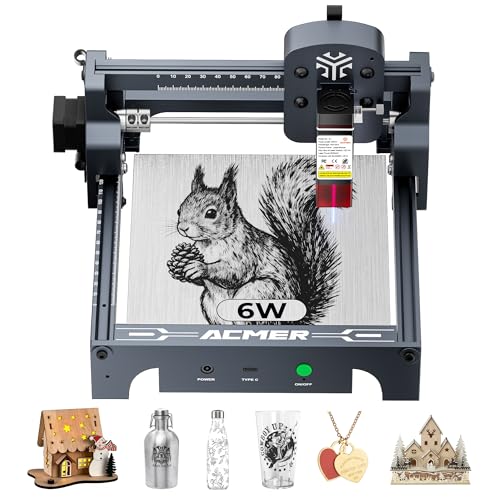
ACMER S1 6W Portable Laser Engraver
Best for: Small detailed engraving on wood and acrylic
- Laser Type
- Diode
- Laser Power
- 6000mW
- Working Area
- 130 x 130mm
- Engraving Speed
- 10,000mm/min
- Software Compatibility
- ACMER studio, LightBurn, LaserGRBL
- Compatible Material
- Wood, Acrylic, Silver
View on Amazon: ACMER S1 6W Portable Laser Engraver Affiliate link
The ACMER S1 is a 6000mW diode laser engraver with a 130x130mm working area. It reaches 10,000mm/min engraving speeds and offers 0.01mm positioning accuracy. The unit weighs 2kg and arrives 99% preassembled. You can use ACMER Studio, LightBurn, or LaserGRBL. It fits small desks and handles wood, acrylic, and leather for detailed craft projects.
Pros
- 6000mW diode laser power for cutting and engraving
- 130x130mm working area in a 2kg portable frame
- 10,000mm/min engraving speed with 0.01mm accuracy
- Supports LightBurn and LaserGRBL software
Cons
- 130x130mm working area limits large project sizes
- No included safety enclosure for laser containment
- Class 4 laser requires strict handling precautions
Good fit if
- You need a lightweight machine for small workspaces
- You want to engrave detailed designs on wood or acrylic
- You prefer software like LightBurn for control
Skip if
- You require a large working area over 130mm
- You need an enclosed safety housing
- You plan to cut thick materials beyond thin plywood
Verdict: The ACMER S1 6W Portable Laser Engraver suits hobbyists who value portability and precise detail work on small materials. It is a solid option for desk-bound crafting rather than large-scale production.

ACMER K1 7W Enclosed Desktop Engraver
Best for: small batch personalization in enclosed spaces
- Laser Type
- Diode
- Laser Power
- 7000mW
- Working Area
- 150 x 150 mm
- Engraving Speed
- 10,000 mm/min
- Software Compatibility
- Acmer Studio, LightBurn, LaserGRBL
- Form Factor
- Fully Enclosed (Class 1)
View on Amazon: ACMER K1 7W Enclosed Desktop Engraver Affiliate link
The ACMER K1 is a Class 1 enclosed desktop laser engraver with a 7000mW diode laser. It features a 150 × 150 mm working area and engraving speeds up to 10,000 mm/min. The unit weighs 2.4 kg and includes a built-in exhaust fan. You can use Acmerstudio, LightBurn, or LaserGRBL software. This machine suits users who need contained operation and fine detail work for small items.
Pros
- Class 1 fully enclosed body for safety
- Built-in exhaust fan reduces smoke and odors
- 0.08 × 0.08mm ultra-fine laser spot
- Compatible with LightBurn and LaserGRBL
Cons
- 150 × 150 mm working area limits large projects
- 7000mW power is lower than the 12W variant
- No mention of mobile app or remote control
Good fit if
- You need a contained workspace for indoor use
- You engrave small items like coasters or tags
- You want fine detail with a 0.08mm spot
Skip if
- You need to cut thick wood over 8mm
- You require a large working area beyond 150mm
- You prefer an open-frame portable design
Verdict: ACMER K1 7W Enclosed Desktop Engraver fits users who prioritize safety and fine detail in a compact desktop setup. It is ideal for small-batch production of personal items in a contained environment.
Specifications side by side
| Spec | ACMER S1 6W Portable Laser Engraver | ACMER K1 7W Enclosed Desktop Engraver |
|---|---|---|
| Laser Type | Diode | Diode |
| Laser Power | 6000mW | 7000mW |
| Working Area | 130 x 130mm | 150 x 150 mm |
| Engraving Speed | 10,000mm/min | 10,000 mm/min |
| Software Compatibility | ACMER studio, LightBurn, LaserGRBL | Acmer Studio, LightBurn, LaserGRBL |
| Form Factor | not stated | Fully Enclosed (Class 1) |
| Compatible Material | Wood, Acrylic, Silver | Wood, Metal, Acrylic |
| Features | not stated | Enclosure |
| Target Audience | DIY | DIY |
| Size | 6000mW | 7W |
| Color | Silver, White-6 | Pack-002 |
| Model | not stated | YYY-K1-7W-0082050037-US-001 |
Frequently asked questions
Can the ACMER S1 engrave on metal?
Yes, the ACMER S1 supports engraving on silver. Its 6W laser power is suitable for small detailed work on this material. You can also use it on wood and acrylic. This makes it a versatile choice for hobbyists who want to mark jewelry or create small decorative items. It is not designed for cutting thick metals.
Is the ACMER K1 safe for home use?
The ACMER K1 is designed for safety in home environments. It features a Class 1 fully enclosed body that contains laser light. This enclosure helps reduce smoke and odors during operation. You get a built-in exhaust fan to manage fumes. This makes it ideal for small-batch personalization in a contained desktop space.
What is the difference in laser output between these two?
The ACMER K1 offers 7000mW of laser output, while the ACMER S1 provides 6000mW. Both machines utilize a 455±5nm blue diode laser. The higher power on the K1 suggests a stronger ability to cut through thicker materials. The S1 is better suited for precise detail work on smaller surfaces.
Does the ACMER S1 support LightBurn software?
Yes, the ACMER S1 supports LightBurn software. It also works with LaserGRBL and includes AI-assisted design tools. This allows you to create complex designs with precision. The machine is built for desk-bound crafting rather than large-scale production. You can easily transfer files from your computer to the engraver for processing.
Which machine is better for portability?
The ACMER S1 is the better choice for portability. It is designed as a portable laser engraver for hobbyists who value mobility. The ACMER K1 is an enclosed desktop unit, which makes it less mobile. If you need to move your engraver frequently, the S1’s form factor is more suitable for your needs.
Can the ACMER K1 handle small batch production?
Yes, the ACMER K1 fits users who prioritize small batch personalization. Its enclosed desktop setup provides a stable environment for consistent results. You get a compact unit that fits well on a desk. It is ideal for creating personalized items in a contained space without compromising on safety or detail.