ACMER S1 6W Portable Laser Engraver Review (2026): A Spec-Based Look
As an Amazon Associate we earn from qualifying purchases. Links on this page are affiliate links.
This acmer s1 6w portable laser engraver review covers a compact diode laser machine designed for home and small business use. It features a 6000mW laser power output and a 130x130mm working area. The unit weighs just 2kg and arrives 99% preassembled, requiring only one minute for laser head installation. It supports engraving speeds up to 10,000mm/min with 0.01mm repeatable positioning accuracy. You can use ACMER Studio, LightBurn, or LaserGRBL for design control. This spec-focused look explains how these details translate to real-world performance for materials like wood, acrylic, and leather.
What stands out
- 6000mW diode laser with 48W machine output for cutting thin plywood and acrylic
- 130x130mm working area in a 2kg portable aluminum alloy frame
- 10,000mm/min engraving speed with 0.01mm positioning accuracy
- 99% preassembled design with 1-minute setup time
- Compatible with ACMER Studio, LightBurn, and LaserGRBL software
Who it fits
Good fit for
This machine suits beginners and hobbyists who want a low-barrier entry into laser engraving. The 99% preassembled design and simple laser head installation remove complex setup hurdles. You will appreciate the 130x130mm working area if you primarily work on small projects like jewelry, tags, or detailed crafts. The inclusion of AI design tools in ACMER Studio helps users who struggle with complicated software workflows. It is also a good fit for professionals needing a lightweight, portable unit for on-site demonstrations or small batch production.
Who should skip it
You should look elsewhere if you need to engrave large items. The 130x130mm working area limits the size of materials you can process. If you require cutting through thick hardwoods or metals, the 6000mW power may be insufficient for deep or rapid cuts. Users needing a massive build volume for commercial-scale production will find this unit too small. Additionally, if you prefer a fully enclosed safety system without external modifications, note that this is an open-frame design. Those needing extensive material compatibility beyond wood, acrylic, and leather may find the options limited.
Verdict: The ACMER S1 offers a compact, preassembled solution for small-scale engraving and cutting tasks. Its portable design and beginner-friendly software make it a practical choice for hobbyists and small businesses.
Key specs explained for ACMER S1
Laser Power: 6000mW
This diode laser output determines how deeply and quickly the machine can cut or engrave materials. A 6000mW rating allows you to process thin woods and acrylics faster than lower-power units. It provides enough intensity for detailed surface marking on metals like aluminum oxide. You should compare this value against other diode models to ensure it meets your throughput needs for small business projects.
Working Area: 130x130mm
The engraving bed measures 130 by 130 millimeters, defining the maximum size of your project. This compact footprint fits easily on a home desk or small workshop table. It is ideal for jewelry, keychains, and small gift items. If you need to engrave larger boards or full sheets, you will need a machine with a bigger frame. Check this dimension against your typical project sizes.
Engraving Speed: up to 10,000mm/min
This speed indicates how fast the laser head moves across your material. Higher speeds reduce the time required for simple text or basic designs. However, intricate details may require slower passes for better quality. You can compare this figure to other entry-level engravers to gauge productivity. Faster speeds are useful for high-volume batch work, while slower speeds help with precision.
Software Compatibility: ACMER studio, LightBurn, LaserGRBL
The machine supports multiple software options, giving you flexibility in how you create designs. ACMER Studio offers AI tools for beginners, while LightBurn provides advanced vector editing for professionals. LaserGRBL serves as a free, simple alternative for basic tasks. This compatibility ensures you are not locked into a single ecosystem. You can choose the interface that matches your skill level and workflow preferences.
ACMER S1 Build and Design
The ACMER S1 6W Portable Laser Engraver features a compact design built for portability and ease of use. According to the listing, the chassis is constructed from industrial-grade aluminum alloy, providing a durable yet lightweight frame. The unit weighs 2kg, making it simple to move between workspaces or store in limited areas. Its exterior finish includes silver and white color options, contributing to a clean, modern aesthetic suitable for home offices or small workshops.
The machine’s physical dimensions are 250×250×162mm, allowing it to fit comfortably on standard desks without consuming excessive space. The working area measures 130x130mm, which is adequate for small to medium-sized projects such as jewelry, keychains, or detailed artwork. This compact footprint ensures that you can operate the device in tight environments without requiring a dedicated industrial setup.
Setup is streamlined by the preassembled nature of the unit. According to the listing, the machine arrives 99% assembled, requiring only a one-minute installation of the laser head. This design choice reduces initial friction for beginners and allows you to begin engraving quickly. The lightweight and small form factor mean you are not tied to a single location, offering flexibility for hobbyists who may need to transport the engraver to different venues or classes.
Setup and Everyday Use Guide
Setup begins with minimal effort because the ACMER S1 arrives 99% preassembled. You only need to install the laser head, a process the listing states takes about one minute. This streamlined assembly means you can start working quickly without complex mechanical adjustments or lengthy calibration routines. The compact frame, measuring 250 by 250 by 162 millimeters, fits easily on most desks or workbenches. Its lightweight aluminum construction allows for simple repositioning if your workspace changes.
Daily operation relies on straightforward software integration. You can use the free ACMER Studio application for initial projects, which includes AI tools to convert text or images into engraving designs. For more advanced workflows, the machine supports LightBurn and LaserGRBL, allowing you to use familiar programs you may already own. It accepts standard file formats including NC, DXF, BMP, JPG, and PNG. This broad compatibility ensures you are not locked into a single ecosystem.
In practice, the 6000mW diode laser and 10,000mm/min speed enable rapid processing of thin materials. The 0.01mm repeatable positioning accuracy supports detailed work on wood, acrylic, leather, and PCBs. The 130 by 130mm working area is sufficient for small crafts and prototypes. Because the unit is Class 4 certified and meets IEC 60825-1 standards, you must follow safety protocols during operation. The multi-core processor handles control signals efficiently, maintaining consistent performance during extended engraving sessions.
Before you buy the ACMER S1
You should verify your workspace dimensions before ordering. The working area measures 130x130mm, which limits large projects. Ensure you have a flat surface that can accommodate the 250x250mm footprint. Check your computer’s operating system compatibility. The machine supports macOS, Windows, and Linux. You must also confirm software access. Free ACMER Studio is included, but LightBurn and LaserGRBL may require separate purchases if you prefer them. Plan for ventilation. This Class 4 laser produces smoke and fumes when cutting wood or acrylic. You need a fan or exhaust system to keep your air clean. Consider safety gear. Eye protection is essential for diode lasers. You should also keep flammable materials away from the engraving zone. This compact unit fits well alongside larger machines for quick, small jobs. It is ideal for detailed work rather than heavy-duty production. Keep the lens clean. Dust affects focus and cut quality. Wipe it gently with approved cloths. This maintenance ensures consistent results over time.
Check before you buy
- Confirm your workspace fits the 250x250mm machine size.
- Check if your computer runs macOS, Windows, or Linux.
- Ensure you have ventilation for smoke and fumes.
- Verify you own or will buy LightBurn software.
The product at a glance
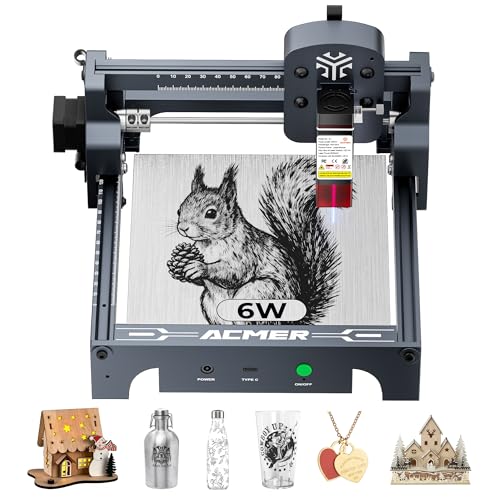
ACMER S1 6W Portable Laser Engraver
Best for: small detailed engraving tasks and portability
- Laser Type
- Diode
- Laser Power
- 6000mW
- Working Area
- 130 x 130mm
- Engraving Speed
- 10,000mm/min
- Software Compatibility
- ACMER studio, LightBurn, LaserGRBL
- Compatible Material
- Wood, Acrylic, Silver
View on Amazon: ACMER S1 6W Portable Laser Engraver Affiliate link
The ACMER S1 is a 6W diode laser engraver with a 130x130mm working area. It reaches engraving speeds up to 10,000mm/min and offers 0.01mm positioning accuracy. The unit arrives 99% preassembled, weighing just 2kg. It supports ACMER Studio, LightBurn, and LaserGRBL software. This compact machine suits beginners and hobbyists who need a lightweight, portable tool for detailed engraving on wood and acrylic.
Pros
- 6000mW diode laser with 455nm wavelength for fine detail
- Engraving speed up to 10,000mm/min
- 0.01mm repeatable positioning accuracy
- 99% preassembled with 1-minute setup
- Compatible with LightBurn and LaserGRBL
Cons
- Small 130x130mm working area limits project size
- Only cuts thin materials like plywood and acrylic
- No mobile app control mentioned in specifications
Good fit if
- You need a lightweight machine for small, detailed projects
- You want a preassembled unit for quick start-up
- You prefer desktop software like LightBurn
Skip if
- You require a large working area for big items
- You need to cut thick wood or metal
- You want a machine with mobile app control
Verdict: ACMER S1 6W Portable Laser Engraver fits hobbyists who value portability and precision over large workspace size. It is ideal for users who want a ready-to-use device for small crafts.
Specifications side by side
| Spec | ACMER S1 6W Portable Laser Engraver |
|---|---|
| Laser Type | Diode |
| Laser Power | 6000mW |
| Working Area | 130 x 130mm |
| Engraving Speed | 10,000mm/min |
| Software Compatibility | ACMER studio, LightBurn, LaserGRBL |
| Compatible Material | Wood, Acrylic, Silver |
| Target Audience | DIY |
| Form Factor | Desktop |
| Size | 6000mW |
| Color | Silver, White-6 |
Frequently asked questions
What materials can the ACMER S1 6W engrave?
The ACMER S1 handles wood, acrylic, and silver. These materials are listed as compatible with the device. You can use it for detailed crafts on these surfaces. The 6W power output is suitable for marking and light engraving on these specific materials. It is not designed for metals other than silver or thick plastics.
Is the ACMER S1 portable?
Yes, the ACMER S1 is designed for portability. It weighs only 2kg, making it easy to move. The compact chassis allows you to take it to different locations. This lightweight design fits hobbyists who need a device for small, detailed tasks away from a fixed workstation. You can carry it with minimal effort.
What is the working area size?
The working area measures 130x130mm. This size limits large projects but suits small detailed engraving tasks. You should verify your workspace dimensions before ordering. The device footprint is 250x250mm, so ensure you have a flat surface that can accommodate this size. It is ideal for small crafts and precise work.
How much laser power does the ACMER S1 have?
The ACMER S1 features 6000mW of laser power. This rating determines how deeply and quickly the machine can cut or engrave. The 6W output allows you to process thin woods and acrylics faster than lower-power units. It provides enough intensity for detailed work on compatible materials like wood and silver.
Is the ACMER S1 preassembled?
Yes, the unit arrives 99% preassembled. You only need to install the laser head, a process that takes about one minute. This streamlined assembly means you can start working quickly without complex mechanical adjustments. You do not need to spend time on lengthy calibration or building the frame from scratch.
What color options are available for the ACMER S1?
The ACMER S1 is available in Silver and White-6 color options. You can choose the finish that best fits your workspace aesthetic. The chassis is constructed from industrial-grade aluminum alloy, providing a durable frame. The color choice does not affect the technical performance or laser power of the device.