xTool P3 80W Flagship CO2 Review: Specs, Pros and Cons
As an Amazon Associate we earn from qualifying purchases. Links on this page are affiliate links.
This xtool p3 80w flagship co2 review covers the xTool P3, a fully enclosed CO2 laser cutter designed for serious production. It features an 80W laser output and a large 36" x 18" working area. These two specs define its capability to handle thick materials like 20mm wood and 25mm acrylic. The machine operates at speeds up to 1200 mm/s. It includes automated features like LiDAR autofocus and dual HD cameras for precision. This setup targets users who need industrial-grade performance in a desktop form factor. It is built for efficiency and safety with Class 1 ratings.
What stands out
- 80W CO2 laser power cuts up to 25mm acrylic
- 36" x 18" workspace for large format projects
- Automated Creation System with LiDAR autofocus and dual HD cameras
- Max engraving speed of 1200 mm/s
- Class 1 safety rating with fully enclosed design
Who it fits
Good fit for
This machine suits professional designers, small manufacturers, and serious hobbyists who need to cut thick materials. The 80W power and 36" x 18" area allow for large, detailed workpieces. The automated setup reduces manual alignment time. Users who value safety and want a Class 1 enclosed system will appreciate the interlocks. It is ideal for those producing clear acrylic or thick wood parts at high speeds.
Who should skip it
Users with limited workspace should look elsewhere, as the unit measures 49.2" in length. If you only engrave thin materials, the 80W power may be excessive. Beginners might find the advanced automation and dual-camera system complex. Those needing a compact desktop unit for light crafting will find this too large and powerful. It is not suited for casual use or small, occasional projects.
Verdict: The xTool P3 delivers industrial cutting power in a fully enclosed desktop package. Its large workspace and high speed make it a strong choice for professional production needs.
Key specs explained for the xTool P3
Laser Power: 80W (80,000 mW)
This power rating indicates a high-energy CO2 laser source. You can cut thick materials that diode lasers cannot handle. The listing states it cuts 20mm wood and 25mm acrylic. This makes it suitable for industrial-grade tasks. Compare this to lower-power units if you need to process dense hardwoods or thick plastics efficiently.
Working Area: 36" x 18"
This large footprint allows you to engrave or cut oversized projects in a single pass. You do not need to split designs or rotate materials manually. It is ideal for batch production or large signage. Check this dimension against your available workspace. Larger areas offer more flexibility for commercial printing jobs.
Engraving Speed: 1200 mm/s max
This speed rating shows how fast the laser head moves across the material. Higher speeds reduce processing time for large batches. It helps you complete jobs faster while maintaining precision. Compare this to slower models if volume is a priority. Faster speeds improve throughput without sacrificing the quality of the final engraving.
Laser Type: CO2
CO2 lasers use a gas mixture to generate the beam. They are generally better at cutting clear acrylic and thick wood than diode lasers. This type offers cleaner edges on non-metals. Choose this if you need versatile material compatibility. It is a standard choice for professional workshops requiring high-precision cutting capabilities.
Form Factor: Fully enclosed (Class 1)
This design houses the laser beam completely within the unit. It prevents exposure to harmful radiation, allowing safer operation in shared spaces. The enclosure also contains fumes and sparks. This is crucial for home studios or small businesses. Ensure your ventilation setup works with this sealed design for optimal safety and air quality.
Design and build of xTool P3
The xTool P3 measures 49.2 inches long, 30.7 inches wide, and 19.5 inches high. These dimensions indicate a substantial footprint that requires dedicated floor space. The listing describes the finish as white. This color choice helps the machine blend into professional studio environments without drawing excessive visual attention. You need to verify your workspace can accommodate this length before installation.
The design is a fully enclosed Class 1 unit. This form factor means the laser operates safely behind barriers, reducing the need for external safety goggles during normal operation. The listing notes a lid interlock system. This feature stops the laser if the enclosure is opened, protecting you from accidental exposure. The white exterior is durable and easy to clean, which matters in a production setting where dust accumulates.
Control layout is managed through the Intelligent Automation System. The listing highlights dual HD cameras and LiDAR ranging. These components handle autofocus and positioning without manual adjustment. This automated approach reduces setup time. You place materials on the auto-lift base and let the system align the workpiece. The enclosed design keeps debris contained, simplifying maintenance. The large 36 by 18 inch area allows you to cut multiple items at once. This layout supports high-volume workflows efficiently.
Setup and Everyday Use
The xTool P3 introduces an automated creation system that changes how you prepare the machine. You place materials on the AutoLift Base, which raises up to 8.7 inches. This feature reduces manual leveling. The system uses LiDAR ranging for autofocus. Dual HD cameras handle precise positioning. One camera offers a 16MP SkyView, while the other provides close-range detail. This setup allows for microscopic alignment accuracy of 0.0079 inches. You do not need to guess where the laser will hit. The distortion-free preview ensures your designs match the workspace exactly.
Daily operation relies on streamlined software workflows. You can use AI-powered Smart Nesting to arrange designs. This tool achieves 98.7% material utilization, which minimizes waste. For mass production, you can import spreadsheets to fill batches. This variable batch fill feature automates repetitive tasks. The large 36-inch by 18-inch area lets you work on bigger projects without frequent repositioning.
Safety is built into the daily routine. The machine is a Class 1 enclosed laser. Lid interlocks stop the laser when the door opens. An active detection system monitors the interior. It also alerts you to scrap buildup. This allows you to run the 80W laser continuously without constant supervision. You can also expand your workflow with optional accessories like the conveyor feeder or rotary engraver, though these are sold separately. The process remains consistent whether you are cutting 20mm wood or engraving clear acrylic.
Before You Buy The P3
This machine requires significant floor space. Its dimensions are 49.2 inches long, 30.7 inches wide, and 19.5 inches high. You must verify your workspace can accommodate this footprint before purchasing. The listing notes that the Intelligent Conveyor Feeder and MagSwap RA3 rotary accessory are sold separately. If you plan to engrave cylindrical items or run continuous long materials, you will need to budget for these add-ons. The AP2 Max Air Purifier is also listed as a separate purchase. Proper ventilation is essential for safe operation with an 80W CO2 source. Check your electrical setup to ensure it supports the power draw of the laser and any connected automation tools. This model sits at the top of the xTool lineup. It suits users who need industrial-grade cutting capacity and automated workflows. Smaller desktop diode lasers cannot match its thick material performance. Consider your production volume and material thickness needs. If you require high-speed cutting of clear acrylic or thick wood, this flagship model is the appropriate choice for your studio or small business.
Check before you buy
- Verify your workspace fits the 49.2 by 30.7 inch footprint.
- Budget for separate rotary and conveyor accessories.
- Plan for ventilation with the AP2 Air Purifier.
- Check electrical capacity for 80W laser operation.
The product at a glance
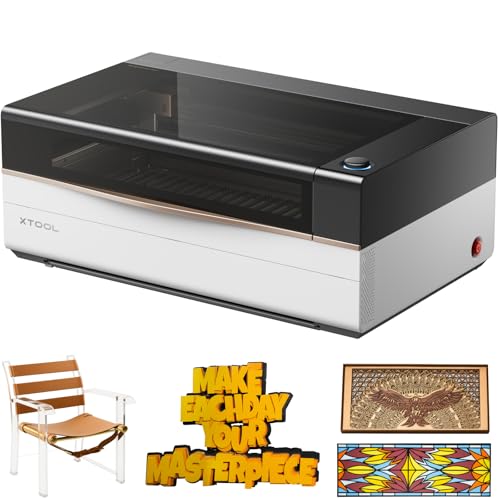
xTool P3 80W CO2 Laser Cutter
Best for: Large-format industrial cutting and automation
- Laser Type
- CO2
- Laser Power
- 80W
- Working Area
- 36" x 18"
- Engraving Speed
- 1200 mm/s
- Form Factor
- Fully Enclosed (Class 1)
- Cutting Capacity
- Wood 20mm, acrylic 25mm
View on Amazon: xTool P3 80W CO2 Laser Cutter Affiliate link
The xTool P3 is a flagship 80W CO2 laser cutter with a 36 x 18 inch working area. It cuts up to 20mm wood and 25mm acrylic at speeds of 1200mm/s. The machine features automated setup with LiDAR autofocus and dual HD cameras. Its enclosed Class 1 design ensures safety. This unit suits users needing large-format industrial-grade cutting and precise engraving capabilities.
Pros
- 80W CO2 laser power for thick material cutting
- 36 x 18 inch large desktop workspace
- Automated creation system with LiDAR autofocus
- Dual HD cameras for precise alignment
- Class 1 fully enclosed safety design
Cons
- Large physical footprint requiring significant desk space
- High power output may exceed hobbyist needs
- Accessories like conveyor feeder sold separately
Good fit if
- You need to cut thick wood or acrylic
- You require a large workspace for big projects
- You want automated setup and positioning
Skip if
- You have limited bench space for large machines
- You only engrave small items on thin materials
- You prefer compact diode laser systems
Verdict: The xTool P3 80W CO2 Laser Cutter delivers industrial cutting power and a massive workspace for serious production. It fits users who prioritize large-format automation and thick material capabilities over compact size.
Specifications side by side
| Spec | xTool P3 80W CO2 Laser Cutter |
|---|---|
| Laser Type | CO2 |
| Laser Power | 80W |
| Working Area | 36" x 18" |
| Engraving Speed | 1200 mm/s |
| Form Factor | Fully Enclosed (Class 1) |
| Cutting Capacity | Wood 20mm, acrylic 25mm |
| Features | Camera, Auto Focus |
| Dimensions | 49.2 × 30.7 × 19.5 inches |
| Size | xTool P3 |
| Color | White |
| Model | MXP-K015-001 |
Frequently asked questions
What is the working area size of the xTool P3?
The xTool P3 features a large 36 by 18 inch working area. This generous space allows you to process full sheets of material without needing to reposition them frequently. It supports large-format industrial cutting tasks that require ample room for complex designs or multiple items at once.
How thick can the xTool P3 cut materials?
This machine can cut up to 20mm wood and 25mm acrylic. The 80W CO2 laser provides the necessary energy density to handle these thicker materials effectively. This capability makes it suitable for heavy-duty production runs that exceed the limits of standard diode lasers.
Does the xTool P3 have an automatic leveling feature?
Yes, it includes an AutoLift Base that raises up to 8.7 inches. This automated system reduces the need for manual leveling before you start a job. It streamlines your workflow by handling the initial setup adjustments quickly and consistently for each new material load.
What autofocus technology does the xTool P3 use?
The system utilizes LiDAR ranging for precise autofocus. This technology ensures the laser maintains the correct focal distance across uneven surfaces or varying material heights. You benefit from consistent engraving quality and cutting accuracy without manual intervention for every single piece.
What are the physical dimensions of the xTool P3?
The unit measures 49.2 inches in length, 30.7 inches in width, and 19.5 inches in height. These substantial dimensions indicate it requires dedicated floor space in your workshop. You should verify your room can accommodate this footprint before installation to ensure proper ventilation and access.
Is the xTool P3 suitable for industrial production?
It is designed for serious production with industrial cutting power. The combination of high wattage and a large workspace supports continuous operation for thick materials. It fits users who prioritize automation and capacity over compact size, making it ideal for commercial environments.
What type of laser source does the xTool P3 use?
It uses a CO2 laser source. This type of laser is particularly effective for cutting and engraving non-metals like wood, acrylic, and fabric. The 80W output provides significant power for deep cuts and high-speed processing compared to lower-power alternatives.