6 Best Alternatives to the Woxcker Laser Engraver 10W DIY (2026)
As an Amazon Associate we earn from qualifying purchases. Links on this page are affiliate links.
The Woxcker 10W Enclosed Laser Engraver delivers a 300×300mm work area and 20,000mm/min speed for batch production. Its fully enclosed design contains fumes and dust, making it suitable for home workshops. If you need different specs, size, feature or brand, these woxcker laser engraver 10w DIY alternatives offer varied capabilities. Some models prioritize touchscreen control or camera systems for precise alignment. Others focus on rotary engraving or lower power for smaller tasks.
We selected 6 options because their specifications overlap with the original. Each alternative shares core traits like 10W laser power or enclosed safety features. You can compare working areas, software compatibility, and material support to find the right fit. This list helps you weigh trade-offs between workspace size, safety mechanisms, and control interfaces. Whether you need a compact desktop unit or a machine with advanced automation, these picks cover the key differences. Review the specs below to decide which features matter most for your projects.
How each alternative compares
Ortur R2 10W Enclosed Laser Engraver
The Ortur R2 trades the Woxcker’s larger 300×300mm bed for a more compact 15.7-inch footprint. You gain a built-in touchscreen and camera system, which allows standalone operation without a computer. The Woxcker relies on external software and Wi-Fi or USB connections. The Ortur prioritizes offline crafting convenience over workspace size. Both machines share a 10W laser and enclosed safety design. If you value a self-contained unit for quick projects, the Ortur is a strong choice. You sacrifice some engraving area for the ease of direct screen control and automated focus.
TOOCAA NOVA 10W Enclosed Laser Engraver
The TOOCAA NOVA 10W includes auto-focus and air assist features that the Woxcker does not list. It also supports cylindrical engraving via a rotary attachment, expanding your material options beyond flat surfaces. The Woxcker offers a larger 300×300mm work area and higher stated speed. The TOOCAA focuses on safety automation and specialized applications like tumblers. Both are enclosed and use 10W lasers. You should pick the TOOCAA if you need precise auto-focus and rotary capabilities. You give up some workspace and raw speed for these added automated features and safety integrations.
WAINLUX X2 10W Enclosed Laser Engraver
The WAINLUX X2 10W is a compact alternative that prioritizes safety and offline use. It lacks the Woxcker’s large 300×300mm bed and high-speed performance. The WAINLUX is designed for beginners who need a smaller, safer footprint. Both machines offer 10W laser power and enclosed designs. The WAINLUX is better for small DIY projects where space is limited. You trade the Woxcker’s batch production speed and larger area for a more manageable size. If you do not need to engrave large items, the WAINLUX provides a simpler, focused experience for home makers.
xTool M2 10W Enclosed Laser Engraver
The xTool M2 10W features a Class 1 enclosed design and a dual-camera system. This offers higher precision for delicate materials like fabric and paper compared to the Woxcker. The Woxcker has a larger work area and faster engraving speeds. The xTool prioritizes safety and fine detail over raw speed and size. Both machines are enclosed and use 10W lasers. You should choose the xTool if you work with sensitive materials and need camera-assisted precision. You give up the Woxcker’s larger bed and higher speed for enhanced safety class and detailed control.
Carverall 6W Desktop Laser Engraver
The Carverall K15 Pro 6W uses a lower 6W laser power compared to the Woxcker’s 10W. This makes it suitable for small, delicate projects rather than heavy-duty cutting. The Carverall is designed for desk use and beginners who prioritize ease of use. The Woxcker offers more power and a larger workspace for batch production. Both are compact options for home makers. You should pick the Carverall if you need a smaller, less powerful machine for light crafting. You give up the Woxcker’s cutting depth and speed for a more affordable, entry-level option.
Creality Falcon 10W Laser Engraver
The Creality Falcon 10W is an open-frame design, unlike the Woxcker’s fully enclosed safety system. It offers faster cutting power and software flexibility for makers who already have a safe workspace. The Woxcker contains fumes and dust, making it better for home use. The Creality is lighter and faster but lacks enclosure features. You should choose the Creality if you prioritize speed and raw power over safety containment. You give up the enclosed design and home-friendly features of the Woxcker for a more industrial, high-speed engraving experience.
Quick picks
Our 7 picks

Woxcker 10W Enclosed Laser Engraver
Best for: batch engraving and safety
- Laser Power
- 10W
- Working Area
- 300×300mm
- Engraving Speed
- 20,000mm/min
- Software Compatibility
- LightBurn, LaserGRBL, CutLabX
- Form Factor
- 360° fully enclosed
- Compatible Material
- Wood, Metal, Leather
View on Amazon: Woxcker 10W Enclosed Laser Engraver Affiliate link
The Woxcker L2 MAX is a 10W enclosed laser engraver with a 300×300mm work area. It reaches speeds of 20,000mm/min for faster batch work. The 360° enclosure contains fumes and noise. It supports LightBurn and LaserGRBL software. This unit suits DIY makers and small businesses needing detailed engraving on wood, leather, and coated metals.
Pros
- 10W laser power for detailed engraving
- 300×300mm large working area
- 20,000mm/min high engraving speed
- 360° fully enclosed safety design
- Supports LightBurn and LaserGRBL
Cons
- Heavier at 20.1 pounds
- Larger footprint than compact units
- No built-in camera for auto-positioning
Good fit if
- You need a large 300×300mm work area
- You want fast batch engraving speeds
- You prefer a fully enclosed design
Skip if
- You require a built-in camera
- You need a compact desktop footprint
- You want AI auto-positioning features
Verdict: The Woxcker L2 MAX 10W 300x300mm fits makers who prioritize speed and safety in a large workspace. It delivers reliable performance for batch production without the complexity of camera systems.

Ortur R2 10W Enclosed Laser Engraver
Best for: standalone offline crafting without a computer
- Laser Power
- 10W
- Working Area
- 300 x 210 mm (11.8" x 8.3")
- Engraving Speed
- Up to 20,000 mm/min (333 mm/s)
- Form Factor
- Fully Enclosed (Class 1)
- Compatible Material
- Wood, Metal, Acrylic, Leather
- Features
- Enclosure, Camera, Touchscreen
View on Amazon: Ortur R2 10W Enclosed Laser Engraver Affiliate link
This fully assembled Class 1 unit gives you a 10W laser module inside a sealed metal-and-acrylic housing. You operate it without a computer by using its onboard touchscreen, built-in HD camera, and TF card slot. With a 300 by 210 mm work area and speeds reaching 20,000 mm/min, it suits hobbyists seeking clean, self-contained desktop production.
Pros
- Built-in touchscreen and TF card slot enable complete offline operation
- Class 1 fully enclosed body arrives pre-assembled out of the box
- Integrated HD camera shows live alignment previews directly on screen
- Engraving speeds reach up to 20,000 mm/min
Cons
- Working area of 300 x 210 mm provides less width than square formats
- Data does not mention an included air assist system
Good fit if
- You want to run jobs offline with a touchscreen instead of a PC or phone.
- You require an enclosed Class 1 safety frame for a shared workspace.
- You rely on a built-in camera to position artwork accurately on blanks.
Skip if
- You need a wider working bed than 300 x 210 mm for large materials.
- You need more than 10W of base laser power out of the box.
Verdict: Ortur R2 Enclosed 10W Laser Engraver delivers computer-free cutting and marking for crafters who prioritize built-in screen control and enclosed safety over a large cutting bed.
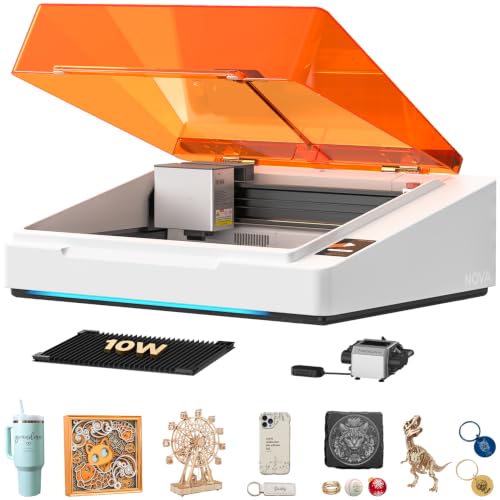
TOOCAA NOVA 10W Enclosed Laser Engraver
Best for: home safety and cylindrical engraving
- Laser Power
- 10W
- Engraving Speed
- 600mm/s
- Software Compatibility
- TOOCAA Studio
- Form Factor
- Class 1 Enclosed
- Compatible Material
- Wood, Metal, Leather
- Features
- Enclosure, Air Assist, Camera, Auto Focus
View on Amazon: TOOCAA NOVA 10W Enclosed Laser Engraver Affiliate link
The TOOCAA NOVA is a 10W Class 1 enclosed laser engraver designed for DIY users. It features a 5MP AI camera for live positioning and 3-second auto focus. The unit reaches speeds of 600mm/s and includes air assist. You get a fully assembled machine with a 360° rotary system for cylindrical items. It runs on TOOCAA Studio software with AI generation tools. This setup suits those wanting safety and precision without manual calibration.
Pros
- 10W laser power for cutting and engraving
- 5MP AI camera with auto live positioning
- 3-second auto focus reduces setup time
- Class 1 enclosed design with flame detection
- Built-in 360° rotary system for tumblers
Cons
- Proprietary TOOCAA Studio software limits third-party app use
- No mention of remote control capability
- Enclosed form factor restricts workpiece size compared to open frames
Good fit if
- You need a Class 1 safe machine for home use
- You want to engrave cylindrical items like tumblers
- You prefer auto focus over manual adjustment
Skip if
- You require open-frame access for large sheets
- You need third-party software compatibility like LightBurn
- You want a compact desktop unit under 15 inches
Verdict: The TOOCAA NOVA 10W Enclosed Laser offers a safe, automated workflow for beginners. It fits users who value safety features and rotary engraving over open-frame flexibility.

WAINLUX X2 10W Enclosed Laser Engraver
Best for: small DIY projects and safety
- Laser Power
- 10W
- Working Area
- 150x200mm
- Engraving Speed
- 7000mm/min
- Software Compatibility
- LightBurn, LaserGRBL, self-developed app
- Form Factor
- Class 1, with Enclosure
- Cutting Capacity
- 5-8mm plywood, 8-10mm pine boards
View on Amazon: WAINLUX X2 10W Enclosed Laser Engraver Affiliate link
The WAINLUX X2 is a Class 1 enclosed laser engraver with 10W power. It features a 150x200mm working area and 0.01mm precision. The machine supports LightBurn and LaserGRBL software. It cuts 5-8mm plywood and 8-10mm pine. The enclosure includes an emergency stop button. This unit suits beginners and DIY makers who need safety and offline engraving capabilities.
Pros
- Class 1 enclosed safety design
- 10W laser power for cutting
- 0.01mm ultra-precision engraving
- Supports LightBurn and LaserGRBL
- Offline engraving capability
Cons
- 150x200mm working area is small
- 7000mm/min speed is moderate
- Self-developed app only
Good fit if
- You need a Class 1 enclosed unit
- You engrave small items
- You prefer offline operation
Skip if
- You require a large working area
- You need high-speed production
- You prefer third-party app control
Verdict: The WAINLUX X2 10W Enclosed Laser Engraver is a compact, safe option for small projects. It fits beginners who prioritize safety and offline use over large workspaces.

xTool M2 10W Enclosed Laser Engraver
Best for: Home DIY makers needing enclosed safety
- Laser Type
- Diode
- Laser Power
- 10W (10000mW)
- Software Compatibility
- xTool Studio
- Form Factor
- Fully enclosed Class 1
- Compatible Material
- Wood, Leather, Paper, Fabric
- Features
- Enclosure, Camera
View on Amazon: xTool M2 10W Enclosed Laser Engraver Affiliate link
The xTool M2 is a Class 1 enclosed laser engraver with 10W diode power. It features built-in dual cameras for real-time preview and precise positioning. You get access to xTool Studio software with AI image generation and templates. This machine supports fabric, leather, wood, and paper. It is designed for DIY makers who want safety and versatility in one enclosed unit.
Pros
- Class 1 enclosed design for home safety
- 10W diode laser power for cutting and engraving
- Built-in dual cameras for Place & Go accuracy
- xTool Studio software with AI image generator
Cons
- CMYK inkjet module sold separately
- RA3 Lite rotary accessory sold separately
- 3W IR laser module sold separately
Good fit if
- You need a Class 1 enclosed machine for home use
- You want dual cameras for precise placement
- You work with fabric, leather, or wood
Skip if
- You require full-color printing without buying extra modules
- You need metal engraving without purchasing the IR module
- You prefer an open-frame desktop unit
Verdict: xTool M2 10W Class 1 Laser Engraver suits DIY makers who prioritize safety and precision. Its enclosed Class 1 design and dual-camera system make it ideal for home crafting with fabric, leather, and wood.

Carverall 6W Desktop Laser Engraver
Best for: Small DIY projects and beginners
- Laser Type
- Diode
- Laser Power
- 6W
- Working Area
- A4
- Engraving Speed
- 15,000 mm/min
- Software Compatibility
- CutLabX, LightBurn, LaserGRBL
- Form Factor
- Class 1
View on Amazon: Carverall 6W Desktop Laser Engraver Affiliate link
The Carverall K15 Pro is a compact 6W diode laser with an A4 work area. It offers 0.01mm precision and 15,000mm/min speed. The unit supports app control and offline TF card loading. It fits 8mm plywood and 5mm acrylic. This model suits beginners needing a small footprint and reliable daily performance.
Pros
- 6W diode laser power for wood and acrylic
- 0.01mm precision with 4K clarity
- 15,000mm/min engraving speed
- A4 work area fits under desks
- App control and offline TF card support
Cons
- 6W power limits cutting depth compared to 10W models
- A4 work area is smaller than standard 300mm beds
- IR head for bare metal is an optional add-on
Good fit if
- You need a compact machine for small projects
- You are a beginner wanting simple setup
- You want app-based control without a PC
Skip if
- You need to cut thick materials over 8mm
- You require a large work area for big signs
- You need bare metal marking without extra purchases
Verdict: The Carverall K15 Pro 6W Laser Engraver is a practical entry point for hobbyists who prioritize desk space and ease of use over raw cutting power. It delivers solid precision for small items but will not replace a high-power machine for heavy-duty tasks.

Creality Falcon 10W Laser Engraver
Best for: DIY makers needing fast cutting power
- Laser Power
- 10W
- Working Area
- 17" x 16"
- Engraving Speed
- Up to 10000mm/m
- Software Compatibility
- LightBurn, LaserGRBL
- Cutting Capacity
- 5mm basswood, 3mm black acrylic
- Compatible Material
- Wood, Metal, Acrylic, Leather, Paper
View on Amazon: Creality Falcon 10W Laser Engraver Affiliate link
The Creality CR-Laser Falcon 10W delivers 10W output power for cutting 5mm basswood or 3mm black acrylic in a single pass. Its 17 by 16 inch working area fits DIY makers who need precision. The machine reaches engraving speeds up to 10000mm/m. You can control it using LightBurn or LaserGRBL via Wi-Fi, USB, or SD card. The aluminum alloy frame ensures stable operation during detailed projects.
Pros
- 10W output power cuts 5mm basswood in one pass
- 0.06mm high precision laser spot for detailed engraving
- Compatible with LightBurn and LaserGRBL software
- Data transfer via Wi-Fi, USB, and SD card
Cons
- Class IIIa laser requires external safety precautions
- Basic model lacks built-in air assist pump
- No enclosed Class 1 safety housing
Good fit if
- You want high cutting speed for wood and acrylic
- You prefer software like LightBurn for control
- You need a large 17 by 16 inch work area
Skip if
- You require a fully enclosed Class 1 machine
- You need built-in air assist without extra parts
- You want a compact desktop unit under 15 inches
Verdict: Creality CR-Laser Falcon 10W suits makers who prioritize raw cutting power and software flexibility over enclosed safety. It fits those who already have a safe workspace and want to cut thicker materials quickly.
Specifications side by side
| Spec | Woxcker 10W Enclosed Laser Engraver | Ortur R2 10W Enclosed Laser Engraver | TOOCAA NOVA 10W Enclosed Laser Engraver | WAINLUX X2 10W Enclosed Laser Engraver | xTool M2 10W Enclosed Laser Engraver | Carverall 6W Desktop Laser Engraver | Creality Falcon 10W Laser Engraver |
|---|---|---|---|---|---|---|---|
| Laser Type | not stated | not stated | not stated | not stated | Diode | Diode | not stated |
| Laser Power | 10W | 10W | 10W | 10W | 10W (10000mW) | 6W | 10W |
| Working Area | 300×300mm | 300 x 210 mm (11.8" x 8.3") | not stated | 150x200mm | not stated | A4 | 17" x 16" |
| Engraving Speed | 20,000mm/min | Up to 20,000 mm/min (333 mm/s) | 600mm/s | 7000mm/min | not stated | 15,000 mm/min | Up to 10000mm/m |
| Software Compatibility | LightBurn, LaserGRBL, CutLabX | not stated | TOOCAA Studio | LightBurn, LaserGRBL, self-developed app | xTool Studio | CutLabX, LightBurn, LaserGRBL | LightBurn, LaserGRBL |
| Form Factor | 360° fully enclosed | Fully Enclosed (Class 1) | Class 1 Enclosed | Class 1, with Enclosure | Fully enclosed Class 1 | Class 1 | not stated |
| Cutting Capacity | not stated | not stated | not stated | 5-8mm plywood, 8-10mm pine boards | not stated | 8 mm plywood, 5 mm black acrylic | 5mm basswood, 3mm black acrylic |
| Compatible Material | Wood, Metal, Leather | Wood, Metal, Acrylic, Leather | Wood, Metal, Leather | Wood, Metal, Leather, Glass | Wood, Leather, Paper, Fabric | Wood, Metal, Acrylic, Leather, Paper | Wood, Metal, Acrylic, Leather, Paper |
| Features | Enclosure | Enclosure, Camera, Touchscreen | Enclosure, Air Assist, Camera, Auto Focus | Enclosure | Enclosure, Camera | not stated | not stated |
| Target Audience | DIY, Small Business | DIY, Beginners | DIY | DIY, Beginners | DIY | DIY, Beginners, Small Business | not stated |
| Size | 300×300mm Max 10W | R2 10W Camera Laser Engraver | 10-w | K15-10W-E | 10W | 6W | Falcon-10W Basic |
| Application | not stated | not stated | Tumblers | not stated | not stated | not stated | not stated |
| Dimensions | 21.6 × 18.8 × 8.43 inches | 18.5 × 15.7 × 8.43 inches | not stated | not stated | not stated | 1 × 1 × 1 inches | 22.4 × 24.9 × 7.79 inches |
| Weight | 20.1 pounds | not stated | not stated | not stated | not stated | not stated | 7.05 pounds |
| Color | Orange | R2 10W Camera Laser Engraver | White & Amber | Blue+Green+Grey | M2 Basic | Gray | Falcon-10W Basic |
| Model | L2 MAX | Ortur R2 | TOOCAA NOVA | not stated | MLM-K610-001 | K15 Pro | CR-Laser Falcon 10W |
Another guide worth a look: klimaire DIY 9 alternatives.
Frequently asked questions
Can I engrave metal with these 10W laser engravers?
Yes, most listed models support metal engraving. The Woxcker L2 MAX, TOOCAA NOVA, and xTool M2 all list metal as a compatible material. The Ortur R2 and WAINLUX X2 also include metal in their supported media. This allows you to mark serial numbers or logos on stainless steel and other metals.
Which machine is best for beginners who want safety?
The Woxcker L2 MAX and xTool M2 are top choices for safety. Both feature fully enclosed Class 1 designs that contain laser light and fumes. The xTool M2 adds a dual-camera system for precision. The Woxcker offers a large 300×300mm bed for batch work without complex setups.
Do I need a computer to use these engravers?
Not necessarily. The Ortur R2 includes a built-in touchscreen, allowing standalone operation without a computer. Most other models, like the Woxcker and Creality Falcon, rely on external software via USB or Wi-Fi. If you prefer offline crafting, the Ortur R2 is the only listed option with a display.
Which laser engraver handles cylindrical objects like tumblers?
The TOOCAA NOVA is designed for cylindrical engraving. Its specifications highlight rotary engraving capabilities, making it ideal for tumblers. Other models focus on flat surfaces. If you plan to mark round items, the TOOCAA NOVA provides the specific automation and features needed for that workflow.
Are there options smaller than the Woxcker 300x300mm size?
Yes, several alternatives offer more compact footprints. The Ortur R2 measures 15.7 inches wide, and the WAINLUX X2 is also compact. The Carverall K15 Pro 6W is the smallest listed option. These fit better on smaller desks while still providing enclosed safety and 10W or 6W power.
Can I cut fabric with these machines?
Yes, fabric cutting is supported by specific models. The xTool M2 is explicitly best for fabric and includes it in compatible materials. The Creality Falcon and Ortur R2 also support fabric. Ensure you use the correct settings for thin materials to avoid fraying or excessive smoke.
Which machine has the fastest cutting speed?
The Woxcker L2 MAX offers a speed of 20,000mm/min. This makes it suitable for batch production and fast cutting. Other models do not list specific speed metrics in the provided data. If speed is your primary concern for high-volume work, the Woxcker provides the highest stated performance.