WECREAT Vista 10W Laser Engraving Review: Who It Fits and Who Should Skip It
As an Amazon Associate we earn from qualifying purchases. Links on this page are affiliate links.
This wecreat vista 10w laser engraving review covers a compact desktop diode unit designed for precision work. The machine features a 10W laser output and a 16.34"x11.42" work area. It engraves at 600mm/s with a fine 0.06*0.04mm spot size. These specs make it suitable for thin materials like fabric and acrylic. The metal-enclosed Class 1 design ensures safety for home or school use. You also get a smart HD camera for accurate positioning. This setup aims to reduce material waste and simplify the learning curve for new users.
What stands out
- Class 1 safety rating with metal-enclosed design
- 16.34"x11.42" working area for desktop use
- Smart HD TopView camera for auto-focus and alignment
- Patented 90° FlipLaser rotary attachment for tumblers
- Compatible with LightBurn and WeCreat MakeIt software
Who it fits
Good fit for
This machine suits DIY creators and beginners who need a safe, enclosed system. The 10W power and fine spot size work well for detailed engraving on wood, leather, and acrylic. The included camera helps you position designs accurately, which reduces errors. The FlipLaser rotary feature is ideal for personalizing mugs and cups. If you want a quiet, clean workspace with air assist and fume extraction, this compact diode laser fits your needs.
Who should skip it
You should look elsewhere if you need to engrave deep into thick metal. The standard 10W diode laser is not designed for heavy industrial cutting. While an optional 2W infrared module exists for metal, it is not included. If you require a larger work area than 16.34"x11.42", this desktop unit will feel cramped. Users who prefer manual calibration over automated camera positioning may find the smart features unnecessary for their workflow.
Verdict: The WECREAT Vista 10W is a safe, precise diode laser best suited for detailed desktop projects. Its camera and rotary features make it a strong choice for beginners and hobbyists.
WECREAT Vista Key Specs Explained
Laser Power: 10W
This diode laser delivers 10,000mW of output. You get enough power to cut thin woods and engrave acrylics quickly. It is strong enough for detailed work but gentle on delicate fabrics. Compare this to lower wattage units that struggle with thicker materials. This level suits beginners who need reliable performance without industrial intensity. It balances speed and precision for most hobby projects.
Working Area: 16.34"x11.42"
The flat bed offers ample space for standard items. You can engrave coasters, phone cases, and small wooden plaques without resizing files. This size fits well on most desks. Larger machines exist, but this footprint saves room in small workshops. It is ideal for creating batches of small gifts. You do not need to worry about fitting large sheets of plywood, keeping your workspace tidy and efficient.
Engraving Speed: 600mm/s
The laser head moves at 600 millimeters per second. This speed reduces wait times for detailed designs. You finish projects faster than with slower units. It maintains accuracy during rapid movement. This is useful for text engraving or complex patterns. Compare it to basic models that crawl slowly. The pace helps you produce more items in less time, making it practical for small business owners or busy creators.
Form Factor: Metal-enclosed (Class 1)
The unit is housed in a metal case and rated Class 1. This means it is safe for home and school use. The enclosure contains laser light and fumes. You do not need special safety goggles for the beam itself. It reduces fire risks and improves air quality management. This form factor is better for shared spaces or family homes compared to open-frame machines.
Software Compatibility: LightBurn, WeCreat MakeIt
You can use LightBurn or the proprietary MakeIt software. LightBurn offers advanced control and file handling. MakeIt provides a library of over 2,000 designs. This dual support gives you flexibility. You are not locked into one ecosystem. If you prefer third-party tools, LightBurn is industry standard. This compatibility ensures you can import various file types easily, streamlining your workflow from design to engraving.
Design and Build Quality
According to the listing, the WECREAT Vista features a metal-enclosed, Class 1 form factor. This design choice prioritizes safety and light containment, making it suitable for home or school environments where stray laser light is a concern. The unit measures 30 inches in length, 23.6 inches in width, and 13.6 inches in height. These dimensions define a compact desktop footprint that fits on standard workbenches without requiring a dedicated industrial space. The finish is described as fire-retardant, adding a layer of durability and safety against heat buildup during extended engraving sessions.
The layout integrates a smart HD TopView camera directly into the unit. This component allows for precise positioning and auto-focus, which reduces material waste by ensuring accurate alignment before the laser engages. You also get a 9-in-1 rotary attachment with a patented 90° FlipLaser mechanism. This specific design eliminates the need for bulky risers or manual calibration when engraving cylindrical items like tumblers or mugs. The compact nature of this rotary system means you can keep it on your desk rather than storing it away.
Air quality management is handled by an included Air Assist and CleanAir fume extractor. This system works quietly to maintain a cleaner working environment, which is practical for indoor use. The overall build suggests a focus on precision and ease of use for beginners. The metal enclosure and integrated safety features mean you can operate it with confidence in shared spaces. The design supports detailed work on thin materials like fabric and acrylic, while the optional infrared module expands its utility to metals.
Setup and Everyday Use Guide
You set up the WECREAT Vista by placing the metal-enclosed unit on your desktop. Its dimensions are 30 inches long, 23.6 inches wide, and 13.6 inches high. The Class 1 safety rating means the enclosure contains the laser light, allowing you to operate it in homes or schools without additional housing. You connect the included Air Assist and CleanAir fume extractor to manage smoke and debris. This system keeps the work area clean during daily use. For positioning, you use the smart HD TopView camera. It provides flat scanning and auto-focus, ensuring 100% alignment. This reduces material waste and simplifies the learning curve for beginners. You do not need manual calibration for basic tasks. When engraving cylindrical items, you attach the 9-in-1 rotary. The patented FlipLaser design allows you to engrave items like 40oz tumblers directly on your desk. You do not need bulky risers or complex manual adjustments. For software, you load your designs into LightBurn or the WeCreat MakeIt app. The MakeIt library includes over 2000 designs and 500 typefaces. You can select from thousands of SVG images for immediate use. The 16.34"x11.42" work area fits standard desktop spaces. You engrave at 600mm/s with a 0.06x0.04mm spot size. This speed and precision suit thin materials like fabric, acrylic, and leather. If you add the optional 2W infrared module, you can engrave metals and plastics. The compact diode laser handles jewelry and intricate details efficiently. Daily operation involves selecting a design, positioning the material under the camera, and starting the job. The system handles the rest with minimal user intervention.
Before You Buy The Vista
You should verify that your workspace can accommodate the unit's 30 by 23.6 by 13.6 inch footprint. The metal enclosure requires adequate ventilation for the integrated CleanAir system. You must ensure your computer runs LightBurn or the WeCreat MakeIt software for full functionality. The optional 2W infrared module is necessary if you plan to engrave metals. You will need to purchase compatible materials like wood, acrylic, and leather separately. Regular maintenance involves cleaning the lens and checking the rotary attachment for wear. This compact diode laser fits well among other desktop options for beginners. It offers precision engraving with a fine spot size. However, you should compare its 16.34 by 11.42 inch work area against larger models if you need more space. The included rotary attachment simplifies cylindrical projects. You should check if the included design library meets your creative needs before purchasing.
Check before you buy
- Verify your desk fits the 30 by 23.6 inch footprint
- Ensure you have LightBurn or MakeIt software installed
- Check if you need the optional 2W infrared module for metal
- Confirm your workspace has ventilation for the air system
The product at a glance
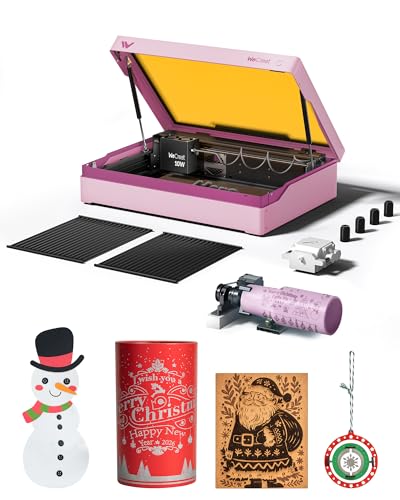
WECREAT Vista 10W Diode Laser
Best for: small DIY projects and tumbler engraving
- Laser Type
- Diode
- Laser Power
- 10W
- Working Area
- 16.34"x11.42"
- Engraving Speed
- 600mm/s
- Software Compatibility
- LightBurn, WeCreat MakeIt
- Form Factor
- Metal-enclosed (Class 1)
View on Amazon: WECREAT Vista 10W Diode Laser Affiliate link
The WECREAT Vista is a Class 1 diode laser with a 10W output and a 16.34 by 11.42 inch work area. It includes a smart HD TopView camera for precise positioning and auto-focus. The unit features a patented FlipLaser rotary attachment for tumblers and mugs. It runs on LightBurn and WeCreat MakeIt software. This desktop engraver suits beginners and DIY users who need safety features and air quality management.
Pros
- 10W diode laser with 600mm/s speed
- Smart HD TopView camera for alignment
- Patented 90-degree FlipLaser rotary attachment
- Class 1 safety with metal enclosure
Cons
- Small 16.34 by 11.42 inch work area
- Requires optional 2W infrared module for metal
- Limited to desktop form factor
Good fit if
- You need precise positioning for small projects
- You want to engrave tumblers without bulky risers
- You prefer a Class 1 safe desktop unit
Skip if
- You require a large work area for big items
- You need native metal engraving without add-ons
- You prefer industrial-grade speed over safety features
Verdict: The WECREAT Vista 10W Diode Laser is a compact, safe choice for beginners who value precision and rotary capabilities for small items like mugs and acrylics.
Specifications side by side
| Spec | WECREAT Vista 10W Diode Laser |
|---|---|
| Laser Type | Diode |
| Laser Power | 10W |
| Working Area | 16.34"x11.42" |
| Engraving Speed | 600mm/s |
| Software Compatibility | LightBurn, WeCreat MakeIt |
| Form Factor | Metal-enclosed (Class 1) |
| Compatible Material | Wood, Metal, Leather, Glass, Jewelry |
| Features | Camera |
| Target Audience | DIY, Beginners |
| Dimensions | 30 × 23.6 × 13.6 inches |
| Size | Rotary Pack |
| Color | Taffy Pink |
| Model | LE2410 |
Frequently asked questions
Is the WECREAT Vista good for beginners?
Yes, it is a compact, safe choice for beginners who value precision. The Class 1 enclosure contains laser light, reducing safety concerns. It also includes rotary capabilities, making it easy to engrave small items like mugs and acrylics without complex setup.
What materials can this 10W diode laser engrave?
You can engrave wood, leather, glass, jewelry, and metal. The 10W diode output provides enough power for detailed work on these surfaces. It is also suitable for delicate fabrics, offering versatility for small DIY projects and personalization tasks.
Does the WECREAT Vista include a rotary attachment?
Yes, the unit supports rotary functions for small items. The product data lists a Rotary Pack as a size option. This feature allows you to engrave cylindrical objects like tumblers and mugs with consistent results, which is ideal for tumbler projects.
How large is the WECREAT Vista work area?
The working area measures 16.34 inches by 11.42 inches. The overall unit dimensions are 30 inches long, 23.6 inches wide, and 13.6 inches high. You should ensure your desktop has enough space to accommodate this footprint comfortably during operation.
Does it have a camera for alignment?
Yes, the WECREAT Vista features an integrated camera. This tool helps you position designs accurately on your material before engraving. It simplifies the setup process, ensuring your projects are centered and aligned correctly, which is useful for precision work.
What software works with this laser engraver?
The machine is compatible with LightBurn and WeCreat MakeIt software. You must ensure your computer can run these programs to control the laser. These tools allow you to design and send files to the engraver for precise cutting and engraving.