WAINLUXPRO WAINLUX X2 10W Laser Engraver Alternatives: 6 Similar Picks Compared
As an Amazon Associate we earn from qualifying purchases. Links on this page are affiliate links.
You are looking at wainluxpro wainlux x2 10w laser engraver alternatives to find a machine that fits your specific workspace needs. The original WAINLUX X2 offers Class 1 enclosure safety and a 150x200mm working area with 10W power. It provides fast engraving speeds and supports offline control via a self-developed app. These specs make it a solid choice for beginners who prioritize eye safety and ease of use.
However, you might prefer a different setup if you need a larger bed or standalone features. Some alternatives offer larger workspaces, such as the 400x400mm area on the Longer RAY5. Others include camera alignment or touchscreen controls for offline operation without a computer. We selected these picks because their core specifications overlap with the original. Each option shares the 10W laser power class but varies in form factor, safety features, and software compatibility. This list helps you compare practical differences between these similar picks.
Our top pick: WAINLUX X2 10W Enclosed Laser Engraver.
How alternatives compare to X2
BlazeX M3 10W Enclosed Laser Engraver
The BlazeX M3 matches the X2’s 10W power and enclosed safety design. It targets beginners who need a protected desktop workspace for indoor crafting. While the X2 emphasizes a self-developed app for control, the BlazeX focuses on sensor-monitored accuracy with 0.01mm detailing. You get similar eye safety and multi-platform support. The BlazeX is slightly more compact in physical dimensions, making it a solid swap if you prioritize precise detailing and a monitored environment over the X2’s specific app ecosystem. It serves the same beginner demographic with a focus on safe, accurate engraving.
Longer RAY5 10W Laser Engraver with Bed
The Longer RAY5 differs significantly by offering a much larger 400 x 400mm workspace compared to the X2’s 150x200mm area. It retains 10W power but adds an air assist system and a honeycomb table for cleaner cuts on wood and acrylic. This model is built for DIY makers who need speed and space rather than the X2’s enclosed safety. You trade the Class 1 protection for a larger cutting area and dual-beam performance. If your projects require handling bigger materials or you prefer an open-bed setup for efficiency, the RAY5 is the practical alternative to the compact X2.
Ortur R2 10W Enclosed Laser Engraver
The Ortur R2 expands the working area to 300 by 210 mm while keeping the 10W power and Class 1 enclosure. It distinguishes itself with camera positioning and touchscreen offline control, features the X2 lacks. You get a larger canvas for projects and a more robust standalone interface. The R2 suits users who want precise alignment tools and a bigger build volume without connecting to a computer. It offers enhanced usability for desktop engraving. If you need more room and advanced alignment features alongside safety, the Ortur R2 provides a superior experience over the standard X2.
VEVOR 10W Enclosed Laser Engraver
The VEVOR JL3PRO offers 10W power and Class 1 enclosure safety, similar to the X2. It prioritizes offline control and solid speed for small wood projects. You get a comparable safety profile but with a different focus on standalone operation. The VEVOR model is heavier, weighing 15 pounds, which may suit users wanting a stable base. It gives up the X2’s specific app integration for straightforward offline use. If you value enclosure safety and offline functionality over the X2’s software ecosystem, the VEVOR is a reliable choice for small-scale wood engraving with a focus on practical, contained operation.
WECREAT Vista 10W Diode Laser
The WECREAT Vista 10W is a desktop diode laser with camera guidance, differing from the X2’s enclosed design. It includes a rotary pack for engraving small items like jewelry, a feature the X2 does not highlight. You trade the Class 1 enclosure for a more versatile desktop form factor with camera alignment. This model suits beginners who need safety features but also want rotary capabilities for diverse materials. It offers a different approach to precision and material variety. If you prioritize rotary engraving and camera-guided accuracy over a fully enclosed workspace, the Vista is a distinct alternative to the X2.
Creality Falcon 10W Laser Engraver
The Creality Falcon 10W focuses on strong cutting power, capable of handling 5mm basswood, which may exceed the X2’s cutting capacity for thicker materials. It offers high speeds and software flexibility for DIY users. You trade the X2’s enclosed safety and fine precision for raw cutting ability and open-bed efficiency. The Falcon is lighter and designed for users who prioritize cutting performance over ultra-fine detailing or enclosure protection. If your main goal is cutting thicker wood quickly and you do not require a Class 1 enclosure, the Creality Falcon provides a more powerful cutting solution than the X2.
Quick picks
Our 7 picks

WAINLUX X2 10W Enclosed Laser Engraver
Best for: Beginners needing Class 1 safety and app control
- Laser Power
- 10W
- Working Area
- 150x200mm
- Engraving Speed
- 7000mm/min
- Software Compatibility
- LightBurn, LaserGRBL, self-developed app
- Form Factor
- Class 1, with Enclosure
- Cutting Capacity
- 5-8mm plywood, 8-10mm pine boards
View on Amazon: WAINLUX X2 10W Enclosed Laser Engraver Affiliate link
The WAINLUXPRO X2 is a Class 1 enclosed laser engraver with 10W output. It offers a 150x200mm working area and cuts up to 10mm pine. The machine reaches 7000mm/min speeds and maintains 0.05mm precision. It supports LightBurn, LaserGRBL, and a free app. This unit suits beginners and DIY users who need safety features and offline mode capabilities.
Pros
- Class 1 enclosed design with UV-resistant acrylic cover
- 10W power cuts 5-8mm plywood and 8-10mm pine
- 7000mm/min engraving speed for high efficiency
- Compatible with LightBurn, LaserGRBL, and a free app
Cons
- 150x200mm working area is smaller than some competitors
- 0.05mm accuracy is slightly lower than 0.01mm rivals
- No Bluetooth or remote control mentioned in specifications
Good fit if
- You need a Class 1 safe machine for indoor use
- You want offline engraving capabilities without a computer
- You prefer app-based control for simple workflows
Skip if
- You require ultra-precision below 0.05mm accuracy
- You need a working area larger than 150x200mm
- You want to cut materials thicker than 10mm pine
Verdict: WAINLUXPRO X2 10W Enclosed Laser is a safe, fast option for beginners who value enclosure safety and app control over maximum precision or larger bed size.

BlazeX M3 10W Enclosed Laser Engraver
Best for: enclosed indoor crafting and beginner desktop engraving
- Laser Power
- 10W
- Form Factor
- Class 1
- Compatible Material
- Wood, Metal, Leather, Glass
- Features
- Enclosure
- Target Audience
- Beginners
- Dimensions
- 4.3 × 1.2 × 4.7 inches
View on Amazon: BlazeX M3 10W Enclosed Laser Engraver Affiliate link
This desktop machine pairs a 10W laser module with 0.01mm engraving accuracy. You get a Class 1 protective enclosure with safety shutoff sensors, an integrated exhaust fan, and an included honeycomb work bed. It supports LightBurn, LaserGRBL, and CutLabX across desktop and mobile platforms. It suits you if you need an enclosed setup for detailed craft projects.
Pros
- Class 1 safety enclosure with lid-open and tilt shutoff sensors
- Comes with a honeycomb work bed and 13 starter materials
- 0.01mm laser precision for fine detail work
- Compatible with Windows, macOS, iOS, and Android systems
Cons
- Air assist pump is an optional upgrade rather than standard equipment
- Rotary roller and camera alignment require separate kit configurations
Good fit if
- You want an enclosed Class 1 laser with an integrated exhaust fan.
- You plan to run projects from mobile apps or LightBurn.
- You need a bundle that already includes a dedicated honeycomb bed.
Skip if
- You require an air assist pump included out of the box.
- You want a factory-integrated camera alignment system in the standard model.
Verdict: BlazeX 10W Laser Engraver with Enclosure provides home crafters and studio users with a protected, sensor-monitored workspace for accurate 0.01mm detailing. It directly serves users who prioritize eye safety and multi-platform operating system support.

Longer RAY5 10W Laser Engraver with Bed
Best for: Large workspace DIY projects with high speed
- Laser Power
- 10W
- Working Area
- 400 x 400mm
- Engraving Speed
- up to 10,000 mm/min
- Cutting Capacity
- 20mm wood, 30mm acrylic
- Compatible Material
- Wood, Metal, Acrylic, Leather, Glass, Paper
- Target Audience
- DIY
View on Amazon: Longer RAY5 10W Laser Engraver with Bed Affiliate link
The Longer RAY5 is a 10W diode laser engraver designed for DIY users who need a large workspace. It features a 400 x 400mm working area and dual-beam technology for speeds up to 10,000 mm/min. The unit includes an air pump and a honeycomb worktable to improve cut quality. It handles materials like wood, acrylic, and leather. This machine suits those prioritizing speed and surface area over compactness.
Pros
- 10W laser power for cutting up to 20mm wood and 30mm acrylic
- Large 400 x 400mm working area for big projects
- Engraving speeds reach 10,000 mm/min with dual-beam technology
- Includes adjustable air pump and honeycomb worktable for cleaner cuts
Cons
- No mention of Wi-Fi or app connectivity for remote control
- No built-in camera or focal length auto-adjustment visible in data
- Requires manual assembly and setup of the air pump and table
Good fit if
- You need a large 400 x 400mm workspace for big projects
- You want fast engraving speeds up to 10,000 mm/min
- You prefer a complete setup with air assist and honeycomb table
Skip if
- You require a compact machine for small desktops
- You need automatic focus or camera-based alignment
- You want wireless app control for remote operation
Verdict: The Longer RAY5 10W Laser Engraver fits DIY makers who prioritize a large 400 x 400mm workspace and high-speed dual-beam performance. It is a practical choice for those who want a ready-to-use setup with air assist and a honeycomb table for clean cuts on wood and acrylic.

Ortur R2 10W Enclosed Laser Engraver
Best for: standalone desktop engraving with camera alignment
- Laser Power
- 10W
- Working Area
- 300 x 210 mm (11.8" x 8.3")
- Engraving Speed
- Up to 20,000 mm/min (333 mm/s)
- Form Factor
- Fully Enclosed (Class 1)
- Compatible Material
- Wood, Metal, Acrylic, Leather
- Features
- Enclosure, Camera, Touchscreen
View on Amazon: Ortur R2 10W Enclosed Laser Engraver Affiliate link
The Ortur Enclosed 10W Laser Engraver is a Class 1 fully enclosed machine designed for standalone desktop crafting. It features a 10W laser output, an integrated HD alignment camera, and a built-in touchscreen for offline TF card operation. With a 300 by 210 mm bed and 20,000 mm/min speeds, it suits beginners wanting clean setup without tethering a computer.
Pros
- Class 1 fully enclosed metal-and-acrylic housing comes fully assembled
- Built-in touchscreen and TF card slot enable offline operation without a PC
- HD camera provides live design preview directly on the material
- Engraving speeds reach up to 20,000 mm/min
- Platform supports swappable laser modules for expanding capabilities
Cons
- Work area measures 300 x 210 mm, which is smaller than open-frame alternatives
- Upgraded or specialized laser modules are sold separately
Good fit if
- You want an enclosed Class 1 laser ready for indoor desktop use out of the box.
- You prefer standalone offline operation using an integrated touchscreen rather than a computer.
- You need an overhead camera to align artwork precisely on small blanks.
Skip if
- You need a work surface larger than 300 x 210 mm for oversized projects.
- You require more than 10W of base optical power without purchasing add-on modules.
Verdict: Ortur Enclosed 10W Laser Engraver delivers fully contained Class 1 safety, camera positioning, and touchscreen offline control for makers working on projects up to 300 by 210 mm.

VEVOR 10W Enclosed Laser Engraver
Best for: Small wood projects needing safety
- Laser Type
- Diode (455 nm)
- Laser Power
- 10W (10000mW)
- Working Area
- 11.8 x 11.8 in
- Engraving Speed
- 7,000 mm/min
- Software Compatibility
- LaserGRBL, LightBurn, CutLabX
- Form Factor
- Enclosed (Class 1)
View on Amazon: VEVOR 10W Enclosed Laser Engraver Affiliate link
The VEVOR JL3PRO is a Class 1 enclosed diode laser with 10W output. It features a 11.8 x 11.8 inch working area and speeds up to 7,000 mm/min. The unit cuts 0.2 inch basswood in one pass. You get an aluminum frame for stability and safety switches. It supports LightBurn and CutLabX. This model suits those who need smoke containment and offline engraving options.
Pros
- Class 1 enclosed safety design
- 10W (10000mW) laser output
- 7,000 mm/min engraving speed
- Cuts 0.2 inch basswood
- Supports LightBurn and CutLabX
Cons
- Smaller 11.8 x 11.8 inch bed
- No metal cutting capability
- Wi-Fi limited to CutLabX app
Good fit if
- You need a Class 1 enclosed unit
- You work with wood and leather
- You want offline engraving options
Skip if
- You need to cut metals
- You require a large bed
- You want universal app Wi-Fi
Verdict: VEVOR JL3PRO 10W Enclosed Laser offers Class 1 safety and solid speed for wood projects. It fits users who prioritize enclosure and offline control over large bed size.
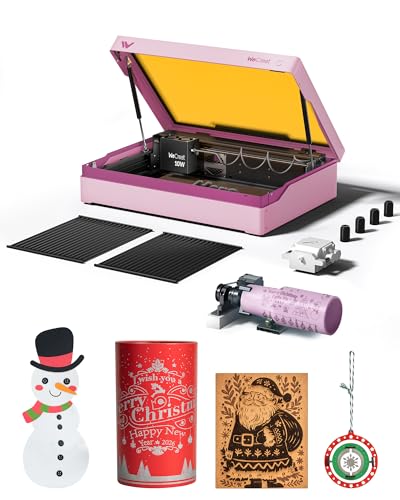
WECREAT Vista 10W Diode Laser
Best for: Beginners needing safety and rotary
- Laser Type
- Diode
- Laser Power
- 10W
- Working Area
- 16.34"x11.42"
- Engraving Speed
- 600mm/s
- Software Compatibility
- LightBurn, WeCreat MakeIt
- Form Factor
- Metal-enclosed (Class 1)
View on Amazon: WECREAT Vista 10W Diode Laser Affiliate link
The WECREAT Vista is a Class 1 diode laser with 10W output and a 16.34"x11.42" work area. It engraves at 600mm/s with a 0.06*0.04mm spot size. You get a smart HD camera for auto-focus and positioning. The unit includes a 9-in-1 rotary and air assist. It fits desktops and suits beginners using LightBurn or WeCreat MakeIt software.
Pros
- Class 1 enclosed metal design for safety
- Smart HD TopView camera for precision
- Patented 90° FlipLaser rotary attachment included
- Compatible with LightBurn software
Cons
- Smaller 16.34"x11.42" work area
- 0.06*0.04mm laser spot size
- Requires separate infrared module for metal
Good fit if
- You need a safe, enclosed Class 1 unit
- You want camera-assisted auto-focus
- You engrave tumblers or small items
Skip if
- You require a large work area
- You need native metal engraving
- You prefer open-frame designs
Verdict: WECREAT Vista 10W Desktop Laser is a safe, camera-guided option for beginners. It fits users who prioritize safety and rotary engraving on small items.

Creality Falcon 10W Laser Engraver
Best for: DIY users needing strong 5mm basswood cutting power
- Laser Power
- 10W
- Working Area
- 17" x 16"
- Engraving Speed
- Up to 10000mm/m
- Software Compatibility
- LightBurn, LaserGRBL
- Cutting Capacity
- 5mm basswood, 3mm black acrylic
- Compatible Material
- Wood, Metal, Acrylic, Leather, Paper
View on Amazon: Creality Falcon 10W Laser Engraver Affiliate link
The Creality CR-Laser Falcon 10W offers 10W output power for cutting 5mm basswood or 3mm black acrylic in one pass. It features a 17 x 16 inch working area and engraving speeds up to 10000mm/m. The machine includes an anti-UV filter and supports LightBurn and LaserGRBL software. This DIY-focused unit suits users who need reliable cutting performance and fast engraving speeds for various materials.
Pros
- 10W output power cuts 5mm basswood in one pass
- Engraving speed reaches 10000mm/m
- 17 x 16 inch working area
- Includes anti-UV filter for eye protection
- Compatible with LightBurn and LaserGRBL software
Cons
- Higher repositioning accuracy of less than 0.007 inches compared to competitors
- Larger physical footprint at 24.9 inches wide
- Heavier build at 7.05 pounds
Good fit if
- You need to cut 5mm basswood in a single pass
- You prefer using LightBurn or LaserGRBL software
- You value fast engraving speeds up to 10000mm/m
Skip if
- You require ultra-precision under 0.01mm
- You need a Class 1 enclosed machine
- You want a compact unit under 20 inches wide
Verdict: The Creality CR-Laser Falcon 10W delivers strong cutting power and high speeds for DIY users. It fits those who prioritize cutting capacity and software flexibility over ultra-fine precision.
Specifications side by side
| Spec | WAINLUX X2 10W Enclosed Laser Engraver | BlazeX M3 10W Enclosed Laser Engraver | Longer RAY5 10W Laser Engraver with Bed | Ortur R2 10W Enclosed Laser Engraver | VEVOR 10W Enclosed Laser Engraver | WECREAT Vista 10W Diode Laser | Creality Falcon 10W Laser Engraver |
|---|---|---|---|---|---|---|---|
| Laser Type | not stated | not stated | not stated | not stated | Diode (455 nm) | Diode | not stated |
| Laser Power | 10W | 10W | 10W | 10W | 10W (10000mW) | 10W | 10W |
| Working Area | 150x200mm | not stated | 400 x 400mm | 300 x 210 mm (11.8" x 8.3") | 11.8 x 11.8 in | 16.34"x11.42" | 17" x 16" |
| Engraving Speed | 7000mm/min | not stated | up to 10,000 mm/min | Up to 20,000 mm/min (333 mm/s) | 7,000 mm/min | 600mm/s | Up to 10000mm/m |
| Software Compatibility | LightBurn, LaserGRBL, self-developed app | not stated | not stated | not stated | LaserGRBL, LightBurn, CutLabX | LightBurn, WeCreat MakeIt | LightBurn, LaserGRBL |
| Form Factor | Class 1, with Enclosure | Class 1 | not stated | Fully Enclosed (Class 1) | Enclosed (Class 1) | Metal-enclosed (Class 1) | not stated |
| Cutting Capacity | 5-8mm plywood, 8-10mm pine boards | not stated | 20mm wood, 30mm acrylic | not stated | 0.2 in basswood | not stated | 5mm basswood, 3mm black acrylic |
| Compatible Material | Wood, Metal, Leather, Glass | Wood, Metal, Leather, Glass | Wood, Metal, Acrylic, Leather, Glass, Paper | Wood, Metal, Acrylic, Leather | Wood, Metal, Leather, Glass | Wood, Metal, Leather, Glass, Jewelry | Wood, Metal, Acrylic, Leather, Paper |
| Features | Enclosure | Enclosure | not stated | Enclosure, Camera, Touchscreen | Enclosure | Camera | not stated |
| Target Audience | DIY, Beginners | Beginners | DIY | DIY, Beginners | not stated | DIY, Beginners | not stated |
| Size | K15-10W-E | 10W | 10W | R2 10W Camera Laser Engraver | not stated | Rotary Pack | Falcon-10W Basic |
| Dimensions | not stated | 4.3 × 1.2 × 4.7 inches | 29.3 × 5.31 × 22.4 inches | 18.5 × 15.7 × 8.43 inches | 21.6 × 18.8 × 8.43 inches | 30 × 23.6 × 13.6 inches | 22.4 × 24.9 × 7.79 inches |
| Weight | not stated | 13 pounds | not stated | not stated | 15 pounds | not stated | 7.05 pounds |
| Color | Blue+Green+Grey | 10w Standard | RAY5+17.3"Honeycomb Bed | R2 10W Camera Laser Engraver | Grey | Taffy Pink | Falcon-10W Basic |
| Model | not stated | M3 | RAY5 | Ortur R2 | JL3PRO | LE2410 | CR-Laser Falcon 10W |
Readers of this guide also look at brother laser printer alternatives.
Frequently asked questions
Which alternative offers the largest workspace for DIY projects?
The Longer RAY5 provides the largest area at 400 x 400mm. It includes a 17.3-inch honeycomb bed and air assist for clean cuts. This setup suits makers who prioritize speed and large surface space over enclosed safety features.
What is the best option for beginners who need camera alignment?
The Ortur R2 includes a camera for precise positioning. It features a touchscreen for offline control and offers Class 1 safety within an enclosure. This machine supports projects up to 300 by 210 mm for desktop use.
Which laser engraver supports rotary engraving for small items?
The WECREAT Vista includes a rotary pack for engraving cylindrical objects. It features a camera for guidance and offers Class 1 safety. This desktop unit is ideal for beginners who need to work on jewelry or small accessories.
Is there an alternative with a touchscreen for offline operation?
Yes, the Ortur R2 includes a built-in touchscreen. You can control the machine without a computer for projects up to 300 by 210 mm. It also provides camera alignment and enclosed Class 1 safety for desktop environments.
Which model is best for cutting 5mm basswood?
The Creality Falcon 10W is designed for strong cutting power. It delivers high speeds suitable for DIY users who need to cut materials like 5mm basswood. It supports various materials including wood, metal, and acrylic without an enclosure.
Which alternative is the most compact for a small desk?
The BlazeX M3 is a compact option at 8 pounds. It measures 1.2 inches in width and fits well on desktops. It provides 10W power and an enclosure for safe indoor crafting with accurate 0.01mm detailing capabilities.
Does any alternative include air assist for cleaner cuts?
The Longer RAY5 comes with air assist. This feature helps remove debris for cleaner cuts on wood and acrylic. It pairs with a large 400 x 400mm workspace and honeycomb bed for a ready-to-use DIY setup.