Looking Beyond the Longer Ray5 Laser Engraver? 6 Alternatives Worth a Look
As an Amazon Associate we earn from qualifying purchases. Links on this page are affiliate links.
The Longer Ray5 20W Laser Engraver delivers a large 400×356mm workspace and 20W cutting power for commercial use. If you need longer ray5 laser engraver alternatives, you might want different specs or sizes. Some buyers prefer enclosed safety features or smaller footprints. Others seek specialized tools like fiber lasers or touchscreen controls. You may also want a different brand or connectivity option.
This guide compares 6 machines that overlap with the Ray5 in key areas like power and speed. Each alternative offers distinct advantages based on its published specifications. You can find options for home DIY, large batch crafting, or precise metal engraving. The list includes models with enclosures, auto-focus, and dual laser types. These choices help you match your specific material needs and workspace constraints. You will see how each machine’s dimensions and features compare to the original Ray5. This helps you decide which specs matter most for your projects.
Comparing Ray5 Alternatives Specs
xTool M2 20W Enclosed Laser Engraver
The xTool M2 20W trades the Ray5’s 400×356mm workspace for a more compact footprint, making it better suited for home desks. It includes an enclosed Class 1 design and a camera system, features the Ray5 lacks in its open-frame setup. This enclosure offers higher safety for home DIY makers who prioritize precision and risk reduction. You give up some large-format cutting capacity for enhanced safety and automated focus accuracy. If you need a safe, precise machine for smaller projects, this enclosed model is a strong alternative.
ACMER S2 20W Diode Laser Engraver
The ACMER S2 20W Diode Laser is significantly smaller than the Ray5, with a compact size ideal for fine detail work. It lacks the large 400×356mm bed, so it is not suitable for big signs or batch production. However, it includes air assist, which helps with clean cuts on wood and acrylic. You sacrifice workspace size for higher precision on small items. This machine is best for users who do not need an enclosure and want fast, accurate engraving on smaller materials without the bulk of a larger commercial unit.
Twotrees TTS-20 Max Large-Format Diode Engraver
The Twotrees TTS-20 Max offers a larger 600×600mm bed compared to the Ray5’s 400×356mm area, allowing for bigger projects like wide signs. It is an open-frame design without an enclosure, similar to the Ray5’s basic setup. This model suits users who need wide coverage and offline operation capabilities. You gain more working area but lose the Ray5’s touchscreen interface and smart connectivity options. If your priority is raw workspace size for large batch crafting, this larger format diode engraver is a practical choice.
xTool F1 Ultra 20W Dual Fiber and Diode Engraver
The xTool F1 Ultra combines a 20W fiber laser with a diode laser, allowing you to engrave both metal and wood in one machine. The Ray5 is a diode-only unit, so it cannot process metals directly. This dual-laser system is enclosed and compact, ideal for small business customization. You gain the ability to mark metals but lose the Ray5’s larger 400×356mm workspace. If you need to switch between metal and wood engraving without buying two separate machines, this specialized fiber and diode combo is the superior option.
ATOMSTACK A20 Pro V2 20W Laser Engraver
The ATOMSTACK A20 Pro V2 20W is an open-frame engraver with an aluminum frame, contrasting with the Ray5’s enclosed safety features. It supports standard software like the Ray5 but lacks the Ray5’s smart touchscreen and app connectivity. This model is suited for users who prioritize speed and material compatibility over enclosed safety. You get a robust aluminum build but lose the protective enclosure and advanced control interface. If you value standard software support and a sturdy frame without the need for a full enclosure, this is a viable alternative.
Creality Falcon A1 Pro 20W Enclosed Engraver
The Creality Falcon A1 Pro 20W is an enclosed engraver with a touchscreen interface, offering a streamlined workflow similar to the Ray5’s smart controls. It includes auto-focus and pre-assembly, features that simplify setup compared to the Ray5’s manual installation. This machine is ideal for users wanting fast, enclosed engraving for wood and acrylic. You gain enhanced safety and ease of use but may have a different working area size. If you prioritize enclosed safety, high speed, and a user-friendly touchscreen interface, this pre-assembled model is a strong competitor.
Quick picks
Our 7 picks
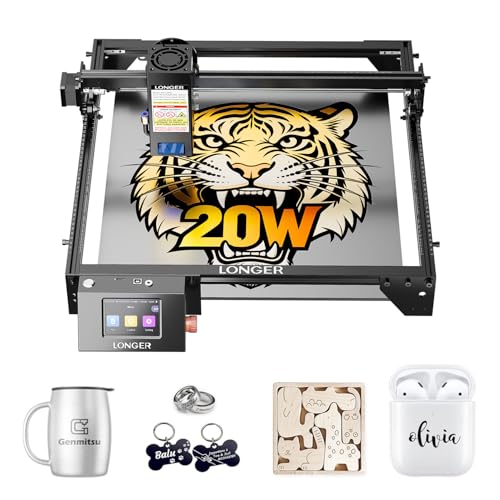
Longer Ray5 20W Laser Engraver
Best for: Commercial studios needing large workspace and high power
- Laser Power
- 20W
- Working Area
- 400 x 365 mm
- Engraving Speed
- 24,000 mm/min
- Software Compatibility
- LaserGRBL, LightBurn
- Cutting Capacity
- 15 mm wood, 8 mm acrylic
- Compatible Material
- Wood, Metal, Acrylic, Leather, Glass
View on Amazon: Longer Ray5 20W Laser Engraver Affiliate link
The Longer Ray5 20W offers a 400 x 365mm working area and a 20W laser module. It reaches engraving speeds up to 24,000mm/min with a 0.08 x 0.1mm spot size. This machine supports 256-color engraving and cuts up to 15mm pine wood in a single pass. You will appreciate the 3.5-inch touchscreen and multi-device control via the ESP32 chipset. It suits users needing large-format precision and commercial-grade throughput.
Pros
- 20W laser power for 15mm pine wood cutting
- 400 x 365mm large working area
- 24,000mm/min maximum engraving speed
- 0.08 x 0.1mm ultra-fine laser spot
- 3.5-inch touchscreen with Wi-Fi and app support
Cons
- Requires assembly upon arrival
- No remote control included
- No Bluetooth connectivity listed
Good fit if
- You need a large 400 x 365mm workspace
- You want to cut thick materials like 15mm wood
- You require high-speed engraving for commercial projects
Skip if
- You need a fully pre-assembled desktop unit
- You require Bluetooth connectivity for file transfer
- You prefer a smaller 300 x 300mm footprint
Verdict: The Longer Ray5 20W 400x356mm delivers high-speed precision and a large workspace for serious makers. You will find it ideal for commercial studios needing to cut thick materials or run multiple machines simultaneously.

xTool M2 20W Enclosed Laser Engraver
Best for: Home DIY makers needing safety and precision
- Laser Type
- Diode
- Laser Power
- 20W (20000mW)
- Software Compatibility
- xTool Studio
- Form Factor
- Fully enclosed Class 1
- Compatible Material
- Wood, Leather, Paper, Fabric
- Features
- Enclosure, Camera
View on Amazon: xTool M2 20W Enclosed Laser Engraver Affiliate link
The xTool M2 is a Class 1 enclosed laser engraver with a 20W diode laser. It features built-in dual cameras for real-time workspace preview and precise positioning. The machine supports xTool Studio software with AI image generation. It is designed for DIY makers who need safety and accuracy. You can add a CMYK inkjet module or IR laser separately for expanded material compatibility.
Pros
- Class 1 enclosed design for safe home use
- Built-in dual cameras for real-time preview
- 20W diode laser for precision cutting
- xTool Studio software with AI tools
- Modular architecture for future upgrades
Cons
- CMYK inkjet module sold separately
- IR laser module sold separately
- RA3 Lite rotary sold separately
Good fit if
- You need a safe, enclosed machine for home use
- You want precise positioning with camera assist
- You plan to expand capabilities with add-ons
Skip if
- You need full-color printing without extra purchases
- You want to engrave metal without buying an IR module
- You prefer an open-frame design for larger materials
Verdict: The xTool M2 20W Enclosed Laser Engraver suits DIY makers who prioritize safety and precision. Its enclosed Class 1 design and camera system make it ideal for home crafters who want accuracy without risk.

ACMER S2 20W Diode Laser Engraver
Best for: high-precision engraving on small to medium items
- Laser Type
- Diode
- Laser Power
- 20W
- Working Area
- 300 × 285mm
- Engraving Speed
- 10,000mm/min
- Software Compatibility
- Acmer Studio
- Compatible Material
- Wood, Acrylic, Leather
View on Amazon: ACMER S2 20W Diode Laser Engraver Affiliate link
The ACMER S2 is a 20W diode laser engraver with a 300 x 285 mm working area. It features a 0.09 x 0.1 mm spot size and supports speeds up to 10,000 mm/min. The unit includes a 25L/min air assist pump and limit switches. It runs on Acmer Studio software and accepts common image formats. This machine suits users seeking high precision and fast engraving for detailed projects.
Pros
- 20W diode laser module delivers strong cutting power
- Ultra-fine 0.09 x 0.1 mm spot size for sharp details
- Includes 25L/min air assist pump to reduce burn marks
- High engraving speed up to 10,000 mm/min
Cons
- Smaller 300 x 285 mm working area than larger alternatives
- Requires assembly to understand machine structure
- No built-in cameras for real-time preview
Good fit if
- You need high precision for intricate photo engraving
- You want fast engraving speeds for detailed designs
- You prefer a lightweight and portable frame
Skip if
- You require a large working area for big projects
- You need built-in dual cameras for safety
- You want a fully enclosed Class 1 machine
Verdict: The ACMER S2 20W Diode Laser fits users who prioritize fine detail and speed over large workspace size. It is a solid choice for precise engraving tasks that do not require enclosed safety features.

Twotrees TTS-20 Max Large-Format Diode Engraver
Best for: Large batch crafting and big signs
- Laser Type
- Diode
- Laser Power
- 20W
- Working Area
- 600 x 600 mm (23.62" x 23.62")
- Engraving Speed
- 30,000 mm/min
- Software Compatibility
- LightBurn, LaserGRBL
- Compatible Material
- Wood, Metal, Acrylic, Glass
View on Amazon: Twotrees TTS-20 Max Large-Format Diode Engraver Affiliate link
The Twotrees TTS-20 Max is a 20W diode laser engraver with a 600 x 600 mm working area. It reaches speeds of 30,000 mm/min and uses LightBurn or LaserGRBL software. You get offline engraving via TF card or Wi-Fi. This large bed suits big signs and batch work. It fits users who need wide coverage without an enclosure.
Pros
- 600 x 600 mm large working area
- 30,000 mm/min engraving speed
- TF card offline standalone operation
- Compatible with LightBurn software
Cons
- No built-in camera for image alignment
- Open-frame design lacks safety enclosure
- Air assist kit not included
Good fit if
- You need a wide 600mm engraving bed
- You want offline TF card engraving
- You prefer open-frame desktop setups
Skip if
- You require a fully enclosed Class 1 machine
- You need built-in dual cameras
- You want a fiber laser option
Verdict: Twotrees TTS-20 Max 20W 600mm Engraver offers a large 600 x 600 mm bed for big projects. It suits you if you need wide coverage and offline operation without an enclosure.

xTool F1 Ultra 20W Dual Fiber and Diode Engraver
Best for: Metal and wood engraving in one machine
- Laser Type
- Fiber & Diode
- Laser Power
- 20W
- Working Area
- 220 x 220 mm
- Engraving Speed
- 10,000 mm/s
- Form Factor
- Fully Enclosed
- Cutting Capacity
- 15mm wood, 12mm black acrylic
View on Amazon: xTool F1 Ultra 20W Dual Fiber and Diode Engraver Affiliate link
The xTool F1 Ultra combines a 20W fiber laser and a 20W diode laser in one fully enclosed unit. It reaches engraving speeds up to 10,000mm/s and offers a 220 x 220 mm working area. The fiber laser handles metals like steel and brass, while the diode laser works on wood and acrylic. This dual-laser system allows you to switch between material types without changing hardware. It suits users who need precision on both metals and organics.
Pros
- Dual 20W fiber and diode lasers for metal and wood
- Engraving speed up to 10,000mm/s
- Fully enclosed safety design with smoke extraction
- 16MP camera for precise positioning and batch processing
Cons
- Heavier build at 43.9 pounds
- Smaller working area than some open-frame competitors
- Auto conveyor sold separately for expanded capacity
Good fit if
- You need to engrave metals like stainless steel or brass
- You want a fully enclosed machine for safer indoor use
- You require high-speed production for small batches
Skip if
- You only engrave wood and do not need metal capabilities
- You require a large working area larger than 220 x 220 mm
- You prefer a lighter, more portable desktop unit
Verdict: The xTool F1 Ultra 20W Fiber & Diode is ideal for makers who need to switch between metal and wood engraving without buying two machines. Its enclosed design and high speed make it suitable for small business customization.

ATOMSTACK A20 Pro V2 20W Laser Engraver
Best for: fast acrylic engraving with standard software
- Laser Power
- 20W (20,000 mW)
- Engraving Speed
- Up to 400 mm/s
- Software Compatibility
- ATOMSTACK App/PC, LightBurn, LaserGRBL
- Compatible Material
- Wood, Metal, Acrylic, Leather
- Dimensions
- 22.8 × 9.84 × 6.69 inches
View on Amazon: ATOMSTACK A20 Pro V2 20W Laser Engraver Affiliate link
The Atomstack A20 Pro V2 delivers 20W of laser power with engraving speeds up to 400mm/s. It features an aluminum alloy frame and integrated linear guides for precision. You can control it via the ATOMSTACK App, Lightburn, or LaserGRBL. This machine supports wood, acrylic, and metal. It is a solid option for users who need reliable cutting speed and standard software compatibility.
Pros
- 20W laser power for strong cutting
- Engraving speeds reach 400mm/s
- Compatible with Lightburn and LaserGRBL
- Aluminum alloy frame for durability
Cons
- Smaller build size than larger alternatives
- No built-in camera system for positioning
- Requires manual focus and setup
Good fit if
- You need fast engraving speeds for acrylic
- You prefer standard PC software control
- You want a durable aluminum frame
Skip if
- You require a fully enclosed Class 1 design
- You need dual camera positioning
- You want a larger working area
Verdict: Atomstack A20 Pro V2 20W Engraver suits users prioritizing speed and standard software support. It fits those who value an aluminum frame over enclosed safety features.

Creality Falcon A1 Pro 20W Enclosed Engraver
Best for: users wanting fast, enclosed engraving
- Laser Type
- Blue-laser
- Laser Power
- 20W
- Engraving Speed
- up to 600 mm/s
- Software Compatibility
- Falcon Design Space
- Form Factor
- Full Enclosed, Class 1
- Cutting Capacity
- 10 mm basswood, 8 mm black acrylic
View on Amazon: Creality Falcon A1 Pro 20W Enclosed Engraver Affiliate link
The Creality Falcon A1 Pro is a full enclosed, Class 1 laser engraver featuring a 20W blue laser. It reaches speeds up to 600 mm/s and cuts 10 mm basswood or 8 mm black acrylic. The unit includes a touchscreen, HD camera, and auto-focus. It arrives 80% pre-assembled. This model suits users who want safety and speed with a compact footprint.
Pros
- Full enclosed Class 1 design blocks smoke and light
- Smart touchscreen and app control for cable-free operation
- Engraving speeds up to 600 mm/s
- HD camera with 3-second AI auto-focus
- 80% pre-assembled for quick setup
Cons
- 2W IR module for metal engraving is not included
- Only compatible with 460 x 346mm honeycomb panels
- No mention of Bluetooth connectivity
Good fit if
- You need a Class 1 enclosed machine for safer indoor use
- You want fast engraving speeds up to 600 mm/s
- You prefer touchscreen control over cable connections
Skip if
- You require immediate metal engraving without buying extra modules
- You need to use standard non-honeycomb mounting panels
- You prefer a machine without a touchscreen interface
Verdict: The Creality Falcon A1 Pro 20W fits users who prioritize enclosed safety and high-speed engraving for wood and acrylic. Its pre-assembly and touchscreen interface make it a practical choice for those who want a streamlined workflow.
Specifications side by side
| Spec | Longer Ray5 20W Laser Engraver | xTool M2 20W Enclosed Laser Engraver | ACMER S2 20W Diode Laser Engraver | Twotrees TTS-20 Max Large-Format Diode Engraver | xTool F1 Ultra 20W Dual Fiber and Diode Engraver | ATOMSTACK A20 Pro V2 20W Laser Engraver | Creality Falcon A1 Pro 20W Enclosed Engraver |
|---|---|---|---|---|---|---|---|
| Laser Type | not stated | Diode | Diode | Diode | Fiber & Diode | not stated | Blue-laser |
| Laser Power | 20W | 20W (20000mW) | 20W | 20W | 20W | 20W (20,000 mW) | 20W |
| Working Area | 400 x 365 mm | not stated | 300 × 285mm | 600 x 600 mm (23.62" x 23.62") | 220 x 220 mm | not stated | not stated |
| Engraving Speed | 24,000 mm/min | not stated | 10,000mm/min | 30,000 mm/min | 10,000 mm/s | Up to 400 mm/s | up to 600 mm/s |
| Software Compatibility | LaserGRBL, LightBurn | xTool Studio | Acmer Studio | LightBurn, LaserGRBL | not stated | ATOMSTACK App/PC, LightBurn, LaserGRBL | Falcon Design Space |
| Form Factor | not stated | Fully enclosed Class 1 | not stated | not stated | Fully Enclosed | not stated | Full Enclosed, Class 1 |
| Cutting Capacity | 15 mm wood, 8 mm acrylic | not stated | not stated | not stated | 15mm wood, 12mm black acrylic | not stated | 10 mm basswood, 8 mm black acrylic |
| Compatible Material | Wood, Metal, Acrylic, Leather, Glass | Wood, Leather, Paper, Fabric | Wood, Acrylic, Leather | Wood, Metal, Acrylic, Glass | Wood, Metal, Jewelry | Wood, Metal, Acrylic, Leather | Wood, Metal |
| Features | Touchscreen | Enclosure, Camera | Air Assist | not stated | Camera | not stated | Enclosure, Touchscreen, Auto Focus |
| Target Audience | DIY | DIY | DIY | DIY | not stated | not stated | not stated |
| Size | 400×365mm | 20W | S2 20W | not stated | xTool F1 Ultra Standalone | A20 PRO V2 | not stated |
| Dimensions | 24.5 × 14 × 5 inches | not stated | not stated | 31 × 30.2 × 4.88 inches | 18 × 17 × 24 inches | 22.8 × 9.84 × 6.69 inches | 32 × 27 × 15 inches |
| Length | not stated | not stated | 11.8 inches | not stated | not stated | not stated | not stated |
| Width | not stated | not stated | 11.2 inches | not stated | not stated | not stated | not stated |
| Weight | not stated | not stated | not stated | not stated | 43.9 pounds | not stated | 37.5 pounds |
| Color | black | M2 Basic | Pack-020 | Black-20 | not stated | Black | Falcon-A1 Pro 20W |
| Model | ray5 20W | MLM-K610-001 | not stated | TTS-20 Max | MXF-K002-B20 | A20 Pro V2 | Falcon A1 Pro |
If you need additive fabrication alongside laser engraving, longer lk10 plus 3d printer alternatives list machines with comparable frame designs.
Frequently asked questions
Which alternative offers the largest workspace?
The Twotrees TTS-20 Max provides a 600 x 600 mm bed, which exceeds the Ray5’s 400 x 356mm area. This large format suits you if you need wide coverage for big signs or batch crafting. It operates without an enclosure, offering a different safety profile than enclosed competitors.
What is the best enclosed option for home use?
The xTool M2 20W features an enclosed Class 1 design that prioritizes safety for home DIY makers. It includes a camera system for precision, making it ideal for crafters who want accuracy without the risks of an open-frame machine. This setup is safer than the open Ray5.
Can I engrave metal with these alternatives?
The xTool F1 Ultra combines fiber and diode lasers, allowing you to switch between metal and wood engraving in one machine. The Atomstack A20 Pro V2 also lists metal as a compatible material. These options suit small business customization or mixed-material projects better than standard diode-only models.
Which model includes a touchscreen interface?
The Creality Falcon A1 Pro features a touchscreen interface for streamlined operation. It also offers pre-assembly and auto-focus capabilities, which simplify the workflow for users seeking fast, enclosed engraving. This makes it a practical choice for those who want to avoid manual setup steps common in other diode engravers.
Is there a budget-friendly compact choice?
The ACMER S2 20W Diode Laser is a solid choice for precise engraving on small to medium items. It measures 11.2 x 11.8 inches, offering a smaller footprint than the Ray5. It includes air assist for fine detail work, prioritizing speed and precision over large workspace size.
Which engraver is best for acrylic?
The Atomstack A20 Pro V2 is listed as the best option for acrylic engraving. It supports standard software and features an aluminum frame. This model suits users who prioritize speed and software compatibility over enclosed safety features, providing a robust build for fast material processing.