Longer Laser B1 30W Laser Engraver Alternatives: 6 Similar Picks Compared
As an Amazon Associate we earn from qualifying purchases. Links on this page are affiliate links.
The Longer Laser B1 30W Laser Engraver Alternatives list helps you find machines that match its core capabilities. This original unit offers a 30W laser with a 450 x 440 mm working area and supports LightBurn software. It handles thick materials like 25mm basswood and 50mm acrylic. You might look elsewhere if you need a different power level or a smaller footprint. Some users prefer lower wattage for safer desktop use. Others may want an enclosed design for added protection. The alternatives here were selected because their specifications overlap with the original. Each pick shares key traits like compatible materials or air assist features. This comparison covers 6 similar picks. You can compare specs directly to see which machine fits your specific workflow. The list includes options from Longer and other brands. Each entry highlights its unique strengths. You can choose based on your exact needs for speed, size, or safety. This guide focuses on practical differences. You will find clear data to make your decision.
Our top pick: Longer Laser B1 30W Engraver.
Comparing Longer B1 Alternatives
Longer Laser B1 48W Engraver
The Longer Laser B1 48W Engraver increases power significantly for users who need to cut through thicker materials more efficiently. While the original B1 30W handles 25mm basswood, this model offers higher wattage for demanding DIY projects. It maintains the large workspace focus but changes the physical dimensions slightly, measuring 28.6 inches in length compared to the original's 29.3 inches. It retains the air assist feature and compatible materials like wood, metal, and acrylic. You should pick this option if your projects regularly require higher cutting speeds or thicker material penetration than the 30W version provides.
Longer B1 20W Laser Engraver with Enclosure
The Longer B1 20W Laser Engraver with Enclosure prioritizes safety over raw power. It reduces the laser output to 20W, which means it will struggle with the thicker 25mm basswood that the 30W model cuts easily. However, it includes a protective enclosure, a feature absent in the standard B1 30W. This makes it ideal for users who need a contained workspace to manage fumes and light exposure. The working area remains substantial, but the reduced power is a trade-off for the added safety and enclosed environment. Choose this if workspace safety is your primary concern over maximum cutting depth.
Creality Falcon 10W Laser Engraver
The Creality Falcon 10W Laser Engraver is a budget-friendly option that sacrifices power for speed and software flexibility. With only 10W of laser power, it cannot cut the thick materials that the 30W B1 handles. It is designed for fast cutting of thin woods and acrylics rather than deep engraving or thick material processing. The unit is lighter, weighing just 7.05 pounds, making it easier to move than the heavier B1. It fits hobbyists who prioritize quick turnaround on thin materials and prefer software flexibility over included accessories. Avoid this if you need to cut 25mm basswood.
Longer RAY5 10W Laser Engraver with Bed
The Longer RAY5 10W Laser Engraver with Bed offers a large 400 x 400mm workspace, which is slightly smaller than the B1's 450 x 440 mm area. It uses a 10W laser, significantly less power than the 30W B1, limiting its ability to cut thick materials. However, it includes air assist and features fast dual-beam speeds for efficient cutting of thinner materials. It is designed for makers who prioritize a large format for DIY projects over high power. If your work involves large, thin pieces rather than thick wood or acrylic, this model provides a good balance of speed and workspace size.
Longer Ray5 20W Laser Engraver with Touchscreen
The Longer Ray5 20W Laser Engraver with Touchscreen adds a rotary axis, allowing you to engrave cylindrical objects like tumblers or pipes. This is a unique capability not available on the standard B1 30W. It uses a 20W laser, which is less powerful than the 30W original, so it will not cut as deeply into thick materials. The unit features a touchscreen interface for easier control. It is a solid choice for users who need to work on round items and want a user-friendly display. Pick this if rotary engraving is essential for your projects, accepting lower cutting power as a trade-off.
Carverall 6W Desktop Laser Engraver
The Carverall 6W Desktop Laser Engraver is a compact, entry-level machine designed for small desk setups and beginners. It has only 6W of power, making it unsuitable for cutting the thick materials that the 30W B1 handles. It is app-controlled and fits well on smaller workspaces. The unit is significantly smaller and lighter than the B1, making it easy to store or move. It handles standard daily projects on thin materials like wood, metal, acrylic, and paper. Choose this if you are a beginner with limited desk space and do not need the high power or large workspace of the B1.
Quick picks
Our 7 picks

Longer Laser B1 30W Engraver
Best for: large workspace and thick material cutting
- Laser Power
- Up to 36W
- Working Area
- 450 x 440 mm
- Engraving Speed
- Up to 600 mm/s
- Software Compatibility
- LightBurn
- Cutting Capacity
- 25mm basswood, 50mm acrylic
- Compatible Material
- Wood, Metal, Acrylic, Leather, Glass, Paper
View on Amazon: Longer Laser B1 30W Engraver Affiliate link
The Longer Laser B1 30W offers up to 36W of output power for cutting 25mm basswood and 50mm acrylic. It features a 450 x 440 mm working area, which is 23.75% larger than many competitors. With speeds up to 600 mm/s, it handles rapid tasks efficiently. The unit includes an auto air assist pump and supports LightBurn software for precise control.
Pros
- Up to 36W laser output power
- 450 x 440 mm large working area
- Cutting speed up to 600 mm/s
- Includes auto air assist pump
- Compatible with LightBurn software
Cons
- 36W power is lower than the 48W alternative
- Smaller working area than the 450x450mm B1 48W
- No mobile app control listed in specifications
Good fit if
- You need to cut thick materials like 50mm acrylic
- You require a large 450 x 440 mm workspace
- You prefer using LightBurn software for precision
Skip if
- You need the highest available power at 48W
- You require a larger 450 x 450 mm bed
- You want built-in mobile app control
Verdict: The Longer Laser B1 30W Engraver suits makers who prioritize a large workspace and high cutting speed. It is ideal for users who need to process thick acrylic and prefer LightBurn software integration.

Longer Laser B1 48W Engraver
Best for: Thick material cutting and large format projects
- Laser Power
- 48000mW (40000mW output)
- Working Area
- 450 x 440 mm
- Engraving Speed
- 36,000 mm/min
- Software Compatibility
- LightBurn, LaserBurn App
- Cutting Capacity
- 40mm basswood, 50mm acrylic
- Compatible Material
- Wood, Metal, Acrylic, Leather, Glass, Paper
View on Amazon: Longer Laser B1 48W Engraver Affiliate link
The Longer Laser B1 offers 48,000 mW total power with 40,000 mW output. It features a 450 x 440 mm work area and 36,000 mm/min speed. This unit includes automated air assist and supports LightBurn software. You get eight safety features and WiFi app control. It suits users needing high power for thick materials and large projects.
Pros
- 40,000 mW output cuts 40mm basswood and 50mm acrylic
- 450 x 440 mm work area provides ample space
- 36,000 mm/min engraving speed boosts productivity
- Automated air assist ensures precision and quality
- LaserBurn App enables WiFi motion control and parameter settings
Cons
- Heavy and bulky build at 26.3 x 28.6 x 9.4 inches
- Requires assembly before first use
- No dedicated physical display mentioned in specifications
Good fit if
- You need to cut thick wood or acrylic quickly
- You require a large work area for big projects
- You want automated air assist for cleaner cuts
Skip if
- You have limited workspace for a large machine
- You prefer a compact desktop-sized engraver
- You need a plug-and-play unit with no assembly
Verdict: Longer Laser B1 48W Engraver fits users who need high power and a large workspace for serious DIY projects. Its speed and cutting capacity handle thick materials efficiently.
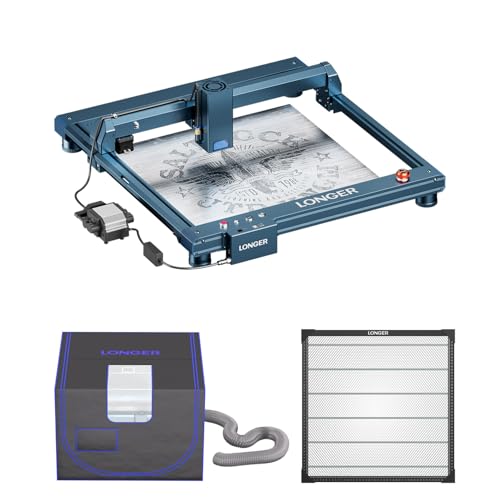
Longer B1 20W Laser Engraver with Enclosure
Best for: DIY users needing a safe, enclosed workspace
- Laser Power
- 20000mW (up to 24W output)
- Working Area
- 450 x 440 mm
- Engraving Speed
- 36,000 mm/min
- Cutting Capacity
- 25mm basswood, 35mm acrylic
- Compatible Material
- Wood, Metal, Acrylic, Leather, Glass, Paper
- Features
- Enclosure, Air Assist
View on Amazon: Longer B1 20W Laser Engraver with Enclosure Affiliate link
The Longer B1 20W laser engraver offers a 450 x 440 mm working area and a 20W laser output. It includes an enclosure with ventilation and air assist for safer operation. The machine features a honeycomb bed to improve heat dissipation and engraving quality. It supports cutting up to 25mm basswood. This model suits DIY users who need a contained workspace for larger projects.
Pros
- Includes protective enclosure with vent
- Large 450 x 440 mm working area
- Integrated air assist system
- Honeycomb bed for better heat management
Cons
- Lower 20W power compared to 30W alternatives
- No mention of app control
- Heavier build due to enclosure
Good fit if
- You need an enclosed workspace for safety
- You require a large 450 x 440 mm area
- You want air assist included
Skip if
- You need higher than 20W power
- You prefer app-controlled operation
- You want a smaller footprint
Verdict: The Longer B1 20W Laser Engraver with Enclosure provides a safe, contained environment for larger DIY projects. It fits users who prioritize workspace safety and ample cutting area over maximum laser power.

Creality Falcon 10W Laser Engraver
Best for: thin wood cutting and fine detail engraving
- Laser Power
- 10W
- Working Area
- 17" x 16"
- Engraving Speed
- Up to 10000mm/m
- Software Compatibility
- LightBurn, LaserGRBL
- Cutting Capacity
- 5mm basswood, 3mm black acrylic
- Compatible Material
- Wood, Metal, Acrylic, Leather, Paper
View on Amazon: Creality Falcon 10W Laser Engraver Affiliate link
The Creality Falcon 10W Laser Engraver provides a 10W optical output and a 17 by 16-inch working area for your desktop projects. It reaches engraving speeds up to 10,000 millimeters per minute and cuts 5mm basswood in one pass. With Wi-Fi, USB, and SD card connections, it suits hobbyists seeking moderate cutting capacity and precise 0.06mm detailing.
Pros
- 0.06 x 0.06 mm laser spot focus for fine detail
- 17 x 16-inch working area
- Wi-Fi, USB cable, and SD card connectivity
- Cuts 5mm basswood and 3mm black acrylic in one pass
Cons
- 10W output delivers less cutting depth than 20W and 30W alternatives
- Top engraving speed caps at 10,000 mm/min
- Base package does not include an air assist pump
Good fit if
- You need a 17 x 16-inch work area for thin wood cutting and detailed engraving.
- You want flexible file transfer options using Wi-Fi, USB, or an SD card.
- You primarily work with thinner stock such as 5mm basswood or 3mm acrylic.
Skip if
- You require 20W to 30W optical power for deep cuts in thick materials.
- You need speeds exceeding 10,000 mm/min to turn out high-volume batches.
Verdict: Creality Falcon 10W Laser Engraver delivers steady 10W diode power and a fine 0.06mm focus spot for crafters personalizing gifts and cutting light craft wood.

Longer RAY5 10W Laser Engraver with Bed
Best for: Large format DIY projects with fast speeds
- Laser Power
- 10W
- Working Area
- 400 x 400mm
- Engraving Speed
- up to 10,000 mm/min
- Cutting Capacity
- 20mm wood, 30mm acrylic
- Compatible Material
- Wood, Metal, Acrylic, Leather, Glass, Paper
- Target Audience
- DIY
View on Amazon: Longer RAY5 10W Laser Engraver with Bed Affiliate link
The Longer RAY5 10W is a DIY laser engraver with a 400 x 400mm working area. It uses dual-beam technology to reach speeds of 10,000 mm/min. It cuts up to 20mm wood and 30mm acrylic. The unit includes an air pump and honeycomb table. It suits users needing a large workspace and fast engraving speeds for various materials.
Pros
- 400 x 400mm working area
- Dual-beam technology for 10,000 mm/min speed
- Cuts 20mm wood and 30mm acrylic
- Includes adjustable air pump and honeycomb table
Cons
- 10W laser power limits cutting depth on dense materials
- No mention of app or remote control connectivity
- Larger physical footprint than 5W or 6W alternatives
Good fit if
- You need a large 400 x 400mm workspace for bigger projects
- You want fast engraving speeds up to 10,000 mm/min
- You require an included air pump and honeycomb bed for cleaner cuts
Skip if
- You need to engrave deep into thick metal or hardwood
- You prefer a compact desktop unit with minimal footprint
- You require smartphone app control for remote operation
Verdict: The Longer RAY5 10W Laser Engraver fits makers who prioritize a large 400 x 400mm workspace and fast dual-beam speeds. It is ideal for cutting thicker wood and acrylic with included air assist.

Longer Ray5 20W Laser Engraver with Touchscreen
Best for: Engraving cylindrical objects with rotary axis
- Laser Power
- 20W
- Engraving Speed
- up to 10000mm/min
- Software Compatibility
- LaserGRBL, LightBurn
- Compatible Material
- Wood, Metal, Acrylic, Leather, Glass
- Features
- Air Assist, Rotary Axis, Touchscreen
- Target Audience
- DIY
View on Amazon: Longer Ray5 20W Laser Engraver with Touchscreen Affiliate link
The Longer RAY5 20W laser engraver features a 0.08x0.1mm compressed beam for high precision. It reaches engraving speeds up to 10000mm/min and includes an air assist kit to remove smoke. The bundle adds a 4-in-1 rotary roller for cylindrical objects and a 3.5-inch touchscreen for control. It supports USB, TF card, WiFi, and app connections. This setup suits DIY users needing versatile engraving and cutting capabilities for various materials.
Pros
- 20W laser power for efficient cutting and engraving
- Includes 4-in-1 rotary roller for cylindrical items
- Built-in 3.5-inch color touch screen
- Air assist kit with adjustable airflow
- Supports LightBurn and LaserGRBL software
Cons
- 20W power is lower than 30W or 48W alternatives
- Smaller work area than larger 30W models
- Requires separate purchase for some accessories
Good fit if
- You need to engrave cylindrical objects like wine glasses
- You prefer a built-in touchscreen for operation
- You want a bundle with air assist included
Skip if
- You require maximum cutting speed for thick materials
- You prefer a larger work area for big projects
- You want a higher 30W or 48W laser power
Verdict: The Longer RAY5 20W with Rotary is a solid choice for users who need to engrave round items and want a touchscreen interface. It offers good precision for DIY tasks but lacks the raw power of higher-wattage competitors.

Carverall 6W Desktop Laser Engraver
Best for: small desk setups and beginner users
- Laser Type
- Diode
- Laser Power
- 6W
- Working Area
- A4
- Engraving Speed
- 15,000 mm/min
- Software Compatibility
- CutLabX, LightBurn, LaserGRBL
- Form Factor
- Class 1
View on Amazon: Carverall 6W Desktop Laser Engraver Affiliate link
The Carverall K15 Pro is a Class 1 diode laser engraver with 6W output. It features an 11.8×7.9-inch A4 work area and 15,000mm/min speed. You can control it via the CutLabX app or offline TF card. It handles 8mm plywood and 5mm black acrylic. The compact design fits under desks. It suits beginners and small business owners needing precise, daily engraving tasks.
Pros
- 6W diode laser power for reliable cutting
- 11.8×7.9-inch A4 work area for common projects
- 15,000mm/min engraving speed for faster jobs
- Class 1 form factor for safer operation
- Supports LightBurn and LaserGRBL software
Cons
- Smaller 11.8×7.9-inch work area limits large projects
- 6W power cuts thicker materials slower than 30W models
- Requires optional IR head for bare metal marking
Good fit if
- You need a compact machine that fits under a desk
- You want app control for easy design management
- You primarily engrave wood, leather, and acrylic
Skip if
- You need to cut materials thicker than 8mm plywood
- You require a large work area for big signs
- You want to mark bare metal without extra parts
Verdict: The Carverall K15 Pro 6W Laser Engraver is a compact, app-controlled option for beginners. It fits well on small desks and handles standard daily projects efficiently.
Specifications side by side
| Spec | Longer Laser B1 30W Engraver | Longer Laser B1 48W Engraver | Longer B1 20W Laser Engraver with Enclosure | Creality Falcon 10W Laser Engraver | Longer RAY5 10W Laser Engraver with Bed | Longer Ray5 20W Laser Engraver with Touchscreen | Carverall 6W Desktop Laser Engraver |
|---|---|---|---|---|---|---|---|
| Laser Type | not stated | not stated | not stated | not stated | not stated | not stated | Diode |
| Laser Power | Up to 36W | 48000mW (40000mW output) | 20000mW (up to 24W output) | 10W | 10W | 20W | 6W |
| Working Area | 450 x 440 mm | 450 x 440 mm | 450 x 440 mm | 17" x 16" | 400 x 400mm | not stated | A4 |
| Engraving Speed | Up to 600 mm/s | 36,000 mm/min | 36,000 mm/min | Up to 10000mm/m | up to 10,000 mm/min | up to 10000mm/min | 15,000 mm/min |
| Software Compatibility | LightBurn | LightBurn, LaserBurn App | not stated | LightBurn, LaserGRBL | not stated | LaserGRBL, LightBurn | CutLabX, LightBurn, LaserGRBL |
| Form Factor | not stated | not stated | not stated | not stated | not stated | not stated | Class 1 |
| Cutting Capacity | 25mm basswood, 50mm acrylic | 40mm basswood, 50mm acrylic | 25mm basswood, 35mm acrylic | 5mm basswood, 3mm black acrylic | 20mm wood, 30mm acrylic | not stated | 8 mm plywood, 5 mm black acrylic |
| Compatible Material | Wood, Metal, Acrylic, Leather, Glass, Paper | Wood, Metal, Acrylic, Leather, Glass, Paper | Wood, Metal, Acrylic, Leather, Glass, Paper | Wood, Metal, Acrylic, Leather, Paper | Wood, Metal, Acrylic, Leather, Glass, Paper | Wood, Metal, Acrylic, Leather, Glass | Wood, Metal, Acrylic, Leather, Paper |
| Features | Air Assist | Air Assist | Enclosure, Air Assist | not stated | not stated | Air Assist, Rotary Axis, Touchscreen | not stated |
| Target Audience | DIY | DIY | DIY | not stated | DIY | DIY | DIY, Beginners, Small Business |
| Size | 30W | B1-40 | B1 Protection Kit(20W) | Falcon-10W Basic | 10W | 20W Bundle Basic Edition | 6W |
| Dimensions | 29.3 × 5.31 × 22.4 inches | 28.6 × 26.3 × 9.4 inches | 20 × 15 × 9 inches | 22.4 × 24.9 × 7.79 inches | 29.3 × 5.31 × 22.4 inches | 24 × 12.5 × 5.9 inches | 1 × 1 × 1 inches |
| Weight | not stated | not stated | not stated | 7.05 pounds | not stated | not stated | not stated |
| Color | Basic(Blue) | Dark blue,Black | BLUE | Falcon-10W Basic | RAY5+17.3"Honeycomb Bed | black | Gray |
| Model | 1-B1 | RAY5-B1 40W | B1 | CR-Laser Falcon 10W | RAY5 | 202406024 | K15 Pro |
If you also compare fabrication hardware, you can evaluate specifications for longer lk10 plus 3d printer alternatives.
Frequently asked questions
Which Longer Laser B1 alternative has the largest working area?
The Longer Laser B1 48W Engraver offers the largest workspace among the alternatives listed. It measures 26.3 inches in width and 28.6 inches in length. This large format allows you to process bigger projects efficiently. It is ideal for users who need high power and ample space for serious DIY tasks.
Can I engrave cylindrical objects with these machines?
Yes, the Longer Ray5 20W Laser Engraver with Touchscreen supports rotary axis functionality. This feature allows you to engrave round items like tumblers or pipes. It includes a touchscreen interface for easier operation. This model is the best choice if you need to work with cylindrical objects alongside standard flat materials.
Which option is best for small desk setups?
The Carverall 6W Desktop Laser Engraver is designed for small spaces. It is compact and fits well on limited desk areas. This machine is controlled via an app, making it user-friendly for beginners. It handles standard daily projects efficiently without taking up much room.
Do any of these engravers come with an enclosure?
The Longer B1 20W Laser Engraver with Enclosure includes a protective casing. This feature provides a safe, contained environment for larger DIY projects. It prioritizes workspace safety over maximum laser power. You get air assist as well, ensuring clean cuts while keeping the workspace protected.
Which machine offers the fastest cutting for thin materials?
The Creality Falcon 10W Laser Engraver delivers fast cutting for thin woods and acrylics. It fits hobbyists who prioritize speed and software flexibility. While it lacks some included accessories, its performance is optimized for quick processing. It is a solid choice for rapid prototyping and small batch work.
What is the highest laser power available in this list?
The Longer Laser B1 48W Engraver has the highest power at 48W. It fits users who need high wattage for thick material cutting. This model handles demanding DIY projects with greater efficiency than lower-power units. It maintains a large workspace while delivering superior cutting capacity for tough materials.
Which engraver is best for beginners on a budget?
The Carverall 6W Desktop Laser Engraver is ideal for beginners and small business users. It is compact and app-controlled, simplifying the learning process. This machine handles standard daily projects efficiently. It is a practical entry-level option for those starting their laser engraving journey with limited space.