Carverall or WIZMAKER? Laser Engravers Compared in 2026
As an Amazon Associate we earn from qualifying purchases. Links on this page are affiliate links.
This carverall vs WIZMAKER laser engraver comparison looks at two diode models for desktop use. Both support LightBurn and LaserGRBL for flexible software control. They share a focus on wood, leather, and acrylic projects. The main difference is power and workspace size. Carverall offers a 6W unit with a smaller A4 bed. WIZMAKER provides a 12W unit with a larger 300mm square area. You should choose based on your power needs and available desk space.
Key differences
| Aspect | Carverall 6W Desktop Laser Engraver | WIZMAKER Wand 12W Diode Laser Engraver |
|---|---|---|
| Laser Power | 6W (6000mW) | 12W |
| Working Area | 11.8×7.9 inches (A4) | 300×300 mm |
| Form Factor | Class 1 | Class 4 |
| Engraving Speed | 15,000mm/min | Up to 10,000 mm/min |
| Software Compatibility | CutLabX, LightBurn, LaserGRBL | LightBurn, LaserGRBL |
| Target Audience | DIY, Beginners, Small Business | DIY, Small Business |
Which one should you choose?
Choose Carverall 6W Desktop Laser Engraver if
- You need a Class 1 safety rating for indoor desk use.
- You prefer a compact A4 workspace that fits under cabinets.
- You want access to a dedicated mobile app and AI design tools.
Choose WIZMAKER Wand 12W Diode Laser Engraver if
- You require double the laser power for faster cutting.
- You need a larger 300mm square work area for bigger projects.
- You want built-in flame monitoring and tilt detection safety features.
Verdict: Choose the Carverall if you prioritize safety class, smaller footprint, and beginner-friendly software. Pick the WIZMAKER if you need higher power and a larger working area for more complex or larger projects.
Carverall vs WIZMAKER: Key Specs
Laser Power
Power determines how deeply and quickly a laser can cut or engrave materials. The WIZMAKER Wand 12W offers 12W of laser power, providing significantly higher energy output than the Carverall K15 Pro, which delivers 6W (6000mW). This difference is critical for cutting thicker materials or working at faster speeds. The WIZMAKER’s higher wattage allows it to handle more demanding tasks with greater ease, while the Carverall’s 6W output is suitable for standard engraving and lighter cutting duties. If you need raw power for thicker wood or harder materials, the WIZMAKER has the advantage here.
Working Area
The workspace size defines the maximum dimensions of your projects. The WIZMAKER Wand 12W features a 300 x 300 mm working area, which is approximately 11.8 x 11.8 inches. In comparison, the Carverall K15 Pro has an 11.8 x 7.9-inch A4-sized bed. The WIZMAKER provides more width, allowing you to engrave wider signs or larger decorative items without splitting the design. The Carverall’s area is narrower, limiting the width of single-pass projects but still covering standard A4 paper sizes. For creators who frequently work on wide-format projects, the WIZMAKER offers more flexibility.
Engraving Speed
Speed impacts how fast you can complete jobs, especially for production or repetitive tasks. The Carverall K15 Pro boasts an engraving speed of 15,000 mm/min, which is notably faster than the WIZMAKER Wand 12W’s top speed of 10,000 mm/min. This higher speed on the Carverall can reduce job times for detailed engraving work. However, higher speeds may sometimes affect depth or detail depending on the material. The WIZMAKER’s lower maximum speed is still efficient for most DIY and small business projects. If rapid throughput is your priority, the Carverall is the quicker option.
Form Factor
Safety classification and physical design affect where and how you can use the machine. The Carverall K15 Pro is a Class 1 laser engraver, which generally means the enclosure is designed to contain the laser beam during operation, offering enhanced safety for home or office environments. The WIZMAKER Wand 12W is a Class 4 laser, which requires strict safety precautions due to the high power and potential for eye or skin injury. Class 1 units are often preferred for beginners or shared spaces due to their inherent safety features. The Carverall holds the edge for safer, enclosed operation.
Software Features
Software ease of use can determine how quickly you start making projects. The Carverall K15 Pro includes CutLabX, a free app available on computers, tablets, and phones. It features AI design tools where you can snap a photo or type a prompt to generate designs, which is helpful for beginners without design skills. It also supports LightBurn and LaserGRBL. The WIZMAKER Wand 12W supports LightBurn and LaserGRBL but relies on standard connectivity via Wi-Fi, hotspot, or USB without mentioning proprietary AI design tools. For users who value AI-assisted design creation, the Carverall provides a distinct advantage.
Carverall or WIZMAKER: Best Pick
Beginners wanting simple setup
The Carverall K15 Pro assembles in five minutes with just six screws and no wiring. It includes a one-touch focus pin to eliminate guesswork and a safety tilt switch. The CutLabX app offers AI design tools and offline TF card support. This reduces technical barriers for new users handling daily projects safely.
Users needing larger workspace
The WIZMAKER Wand provides a 300x300mm working area, which is larger than the Carverall's A4-sized bed. This extra space accommodates bigger signs and decor items. It delivers 12W power for faster cutting of wood up to 8mm. The modular construction allows straightforward setup for serious DIY creators needing more room.
Creators marking bare metal
The Carverall K15 Pro supports an optional 1W IR head for bare metal marking. This adds capability without buying a second machine. The WIZMAKER Wand only lists coated metals. The Carverall also features a 15,000mm/min speed and 0.01mm precision for detailed work on various materials like glass and slate.
The products compared

Carverall 6W Desktop Laser Engraver
Best for: Beginners needing compact A4 engraving
- Laser Type
- Diode
- Laser Power
- 6W
- Working Area
- A4
- Engraving Speed
- 15,000 mm/min
- Software Compatibility
- CutLabX, LightBurn, LaserGRBL
- Form Factor
- Class 1
View on Amazon: Carverall 6W Desktop Laser Engraver Affiliate link
The Carverall K15 Pro is a Class 1 diode laser with 6W power and a 11.8×7.9-inch A4 work area. It offers 15,000mm/min speed and 0.01mm precision. You get app control via CutLabX and compatibility with LightBurn and LaserGRBL. It cuts 8mm plywood and 5mm black acrylic. This compact machine suits beginners and small businesses needing reliable daily performance without complex setup.
Pros
- 6W diode laser handles 8mm plywood and 5mm black acrylic
- 11.8×7.9-inch A4 workbed fits under most desks
- 15,000mm/min engraving speed with 0.01mm precision
- Works with CutLabX, LightBurn, and LaserGRBL software
Cons
- 6W power limits cutting depth compared to higher wattage models
- 11.8×7.9-inch area is smaller than 16×16-inch competitors
- Requires TF card or PC for offline jobs
Good fit if
- You need a compact A4-sized engraver for small projects
- You want app control and simple software compatibility
- You are a beginner looking for easy setup
Skip if
- You require cutting thick materials beyond 8mm plywood
- You need a large work area for big signs
- You prefer high-power diodes for faster cutting
Verdict: Carverall K15 Pro 6W Laser Engraver fits beginners who need a compact, app-controlled machine for small daily projects. It is not for users needing large formats or deep cutting power.
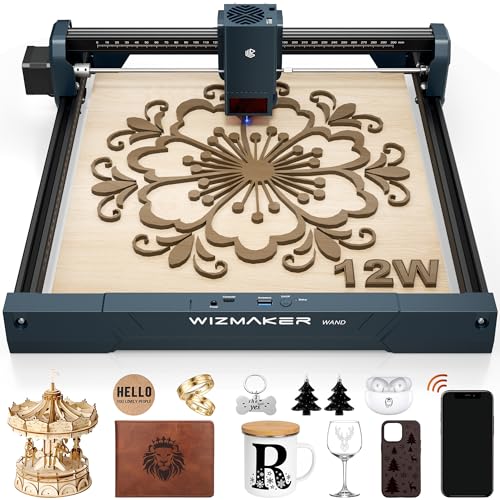
WIZMAKER Wand 12W Diode Laser Engraver
Best for: High-speed engraving and small batch production
- Laser Type
- Diode
- Laser Power
- 12W
- Working Area
- 300 x 300 mm
- Engraving Speed
- Up to 10,000 mm/min
- Software Compatibility
- AtomStack, LightBurn, LaserGRBL
- Cutting Capacity
- Wood up to 8mm
View on Amazon: WIZMAKER Wand 12W Diode Laser Engraver Affiliate link
The WIZMAKER Wand 12W is a desktop diode laser with a 300 x 300 mm working area. It offers 12W of power and engraving speeds up to 10,000 mm/min. This setup supports cutting wood up to 8 mm thick. You can control it via Wi-Fi or USB using LightBurn or LaserGRBL. It suits DIY creators and small businesses needing precision and speed.
Pros
- 12W diode laser power for detailed engraving and cutting
- 300 x 300 mm work area for larger projects
- Engraving speeds up to 10,000 mm/min
- Compatible with LightBurn and LaserGRBL software
- Built-in tilt detection and flame monitoring for safety
Cons
- Smaller 300 x 300 mm work area compared to larger models
- No mention of mobile app control for iOS or Android
- Limited to 8 mm wood cutting capacity
Good fit if
- You need high-speed engraving for intricate designs
- You want to cut wood up to 8 mm thick
- You prefer using LightBurn or LaserGRBL software
Skip if
- You require a larger work area than 300 x 300 mm
- You need to cut wood thicker than 8 mm
- You prefer direct app control without a computer
Verdict: WIZMAKER Wand 12W Laser Engraver delivers fast, precise engraving and cutting for DIYers and small businesses. It fits users who value speed and software flexibility over a larger bed size.
Specifications side by side
| Spec | Carverall 6W Desktop Laser Engraver | WIZMAKER Wand 12W Diode Laser Engraver |
|---|---|---|
| Laser Type | Diode | Diode |
| Laser Power | 6W | 12W |
| Working Area | A4 | 300 x 300 mm |
| Engraving Speed | 15,000 mm/min | Up to 10,000 mm/min |
| Software Compatibility | CutLabX, LightBurn, LaserGRBL | AtomStack, LightBurn, LaserGRBL |
| Form Factor | Class 1 | not stated |
| Cutting Capacity | 8 mm plywood, 5 mm black acrylic | Wood up to 8mm |
| Compatible Material | Wood, Metal, Acrylic, Leather, Paper | Wood, Acrylic, Leather, Paper |
| Target Audience | DIY, Beginners, Small Business | DIY, Small Business |
| Dimensions | 1 × 1 × 1 inches | 3.94 × 1.97 × 3.94 inches |
| Weight | not stated | 2 pounds |
| Size | 6W | WAND12W |
| Color | Gray | Navy Blue |
| Model | K15 Pro | WM-LE002 |
Frequently asked questions
Which laser engraver is better for beginners?
The Carverall K15 Pro is the better choice for beginners. It is designed for compact A4 engraving and includes app control via CutLabX. The machine features a one-touch focus pin to simplify setup. It is not suitable for users needing large formats or deep cutting power.
Can these engravers cut metal?
Only the Carverall K15 Pro lists metal as a compatible material. The WIZMAKER Wand 12W supports wood, acrylic, leather, and paper. If you need to engrave metal surfaces, the Carverall model is the appropriate option. The WIZMAKER unit is strictly for non-metal materials.
Which model offers higher laser power?
The WIZMAKER Wand 12W provides 12W of laser power. This is double the 6W output of the Carverall K15 Pro. Higher power allows for faster engraving and the ability to cut thicker materials. The WIZMAKER is ideal for small batch production requiring speed.
Is the WIZMAKER Wand suitable for small businesses?
Yes, the WIZMAKER Wand 12W is suitable for small businesses. It targets DIYers and small business users who value speed. The 12W diode laser enables high-speed engraving and cutting. It fits users who prioritize software flexibility and production speed over a larger bed size.
What materials does the Carverall K15 Pro support?
The Carverall K15 Pro supports wood, metal, acrylic, leather, and paper. It is a versatile desktop engraver for small daily projects. The 6W power is sufficient for engraving these materials. It is not designed for deep cutting or large format work.
Does the WIZMAKER Wand support LightBurn?
Both models support LightBurn and LaserGRBL for flexible software control. The WIZMAKER Wand 12W allows you to use these programs for precise engraving. This compatibility ensures you can use your preferred design software. The Carverall model also works with these standard engraving programs.
Which engraver is more compact?
The Carverall K15 Pro is designed for compact A4 engraving. It fits beginners needing a small desktop footprint. The WIZMAKER Wand 12W is also a desktop unit but focuses on speed. The Carverall model is the better pick if space is your primary constraint.