Carverall A1 Pro 5W Desktop Laser Engraver vs Carverall K15 Pro 10W Laser Engraver: Spec Comparison
As an Amazon Associate we earn from qualifying purchases. Links on this page are affiliate links.
This carverall a1 pro 5w desktop laser engraver vs k15 pro 10w laser comparison highlights two enclosed Class 1 machines. Both feature fully enclosed safety designs and support CutLabX software. They target beginners and small business users with reliable after-sales support. The main difference lies in their power and workspace. The A1 Pro offers a compact 3.94-inch square area with 5W power. The K15 Pro provides a larger 11.8x7.9-inch area with 10W power. Each model suits different project scales and material thicknesses.
Key differences
| Aspect | Carverall A1 Pro 5W Enclosed Laser Engraver | Carverall K15 Pro 10W Enclosed Engraver |
|---|---|---|
| Laser Power | 5W (verified 5.12–5.35W) | 10W (10000mW) |
| Working Area | 3.94×3.94-inch | 11.8×7.9-inch (300 x 200 mm) |
| Engraving Speed | 12,000mm/min | 15,000mm/min |
| Cutting Capacity | 4mm plywood, 3mm acrylic | not listed |
| Software Compatibility | CutLabX, LightBurn, LaserGRBL | CutLabX, mobile APP, LaserGRBL, LightBurn |
| Dimensions | 11×10.9×12.8 inches | 10.8×5.16×18.6 inches |
Which one should you choose?
Choose Carverall A1 Pro 5W Enclosed Laser Engraver if
- You need a compact machine for small items like pet tags.
- You prefer a verified 5W power level for delicate work.
- You want a square work area for centered designs.
Choose Carverall K15 Pro 10W Enclosed Engraver if
- You require a larger 11.8x7.9-inch workspace for bigger projects.
- You need higher 10W power for faster cutting.
- You prioritize higher engraving speeds up to 15,000mm/min.
Verdict: Choose the A1 Pro if your projects are small and you value a compact footprint. The K15 Pro is better for larger materials and faster production cycles. Both models offer enclosed safety and beginner-friendly software.
A1 Pro vs K15 Pro Specs
Laser Power
The Carverall A1 Pro 5W delivers verified power between 5.12 and 5.35 watts. It cuts 4mm plywood and 3mm acrylic in a single pass. The Carverall K15 Pro offers 10 watts of power. This doubled output allows for deeper and faster cuts on thicker materials. If you need to process heavier wood or dense acrylic quickly, the K15 Pro provides significantly more cutting force. The A1 Pro is sufficient for thin materials and surface engraving. Choose the K15 Pro for higher power demands.
Working Area
The A1 Pro features a compact 3.94 by 3.94-inch work area. This size is ideal for small items like pet tags, jewelry blanks, and bookmarks. The K15 Pro provides a much larger 300 by 200 millimeter area, which equals 11.8 by 7.9 inches. This larger bed covers most daily engraving projects and supports larger signs or crafts. If you plan to engrave bigger items or batch process multiple small pieces at once, the K15 Pro is the better choice. The A1 Pro is strictly for miniature projects.
Engraving Speed
The Carverall A1 Pro operates at a maximum speed of 12,000 millimeters per minute. This speed is adequate for detailed work on small surfaces. The Carverall K15 Pro reaches 15,000 millimeters per minute. The faster movement reduces production time for larger designs and batch jobs. Faster speeds help you complete projects more efficiently without sacrificing the 0.01mm precision offered by both machines. If speed is critical for your workflow, the K15 Pro has the advantage.
Connectivity
The A1 Pro supports camera integration, AI design prompts, and app control. It also includes a pre-installed TF card for offline batch jobs and works with LightBurn and LaserGRBL. The K15 Pro supports WiFi, USB, and TF card connections. It allows for offline standalone operation and remote mobile app control. It also works with LightBurn and LaserGRBL. The K15 Pro offers more flexible connection options with WiFi for wireless control. The A1 Pro emphasizes camera alignment for precision placement.
Dimensions
The A1 Pro measures 12.8 inches in length, 11 inches in width, and 10.9 inches in height. It is a compact desktop unit designed for small workspaces. The K15 Pro measures 18.6 inches in length, 10.8 inches in width, and 5.16 inches in height. It is longer but significantly shorter in height. The K15 Pro requires more counter length but less vertical clearance. Consider your available desk space when choosing between the taller A1 Pro and the wider K15 Pro.
Material Compatibility
The A1 Pro works with over 150 materials, including wood, leather, acrylic, glass, fabric, and coated metals. It can swap to an IR head for bare metal marking. The K15 Pro handles over 300 materials, including wood, coated metals, acrylic, glass, leather, paper, and plastics. It also supports an optional 1W infrared head for professional metal engraving on stainless steel and aluminum. The K15 Pro supports a wider variety of materials out of the box.
Choose Your Carverall Laser Engraver
Small batch makers needing speed
The K15 Pro features a larger 300 x 200 mm work area and faster 15,000mm/min speed. This 10W power handles thicker materials more efficiently. The spacious bed suits sign making and larger craft gifts. You gain significant throughput for daily production cycles without sacrificing fine detail or precision.
Beginners prioritizing safety and compact size
The A1 Pro offers a compact 3.94 x 3.94-inch footprint ideal for small workspaces. Its enclosed Class 1 design ensures safety for homes with children or pets. The built-in HD camera simplifies alignment. This setup reduces guesswork for new users while providing reliable performance for small projects like pet tags.
Users requiring precise alignment tools
The A1 Pro includes an HD camera for precise material positioning. You can snap a photo and drag designs to exact spots. This feature eliminates misalignment issues common in manual setups. The 0.01mm precision combined with visual confirmation ensures accurate results for detailed engraving tasks without complex calibration steps.
The products compared
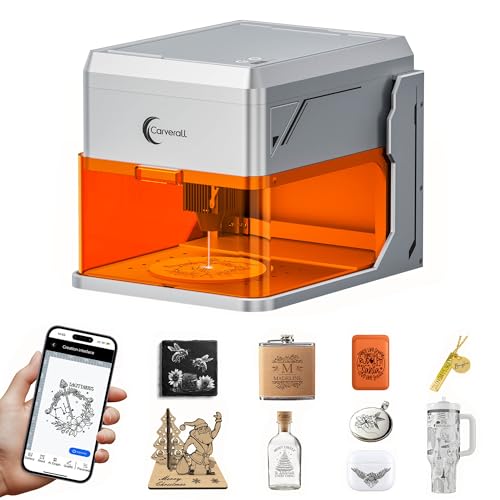
Carverall A1 Pro 5W Enclosed Laser Engraver
Best for: Small batch home crafting and pet tags
- Laser Power
- 5W
- Working Area
- 3.94" x 3.94"
- Engraving Speed
- 12,000 mm/min
- Software Compatibility
- CutLabX, LightBurn, LaserGRBL
- Form Factor
- Fully Enclosed (Class 1)
- Cutting Capacity
- 4mm plywood, 3mm acrylic
View on Amazon: Carverall A1 Pro 5W Enclosed Laser Engraver Affiliate link
The Carverall A1 Pro is a fully enclosed Class 1 desktop laser with a 3.94x3.94-inch working area. It delivers verified 5W power for cutting 4mm plywood or 3mm acrylic. You get an HD camera for precise alignment and app control via CutLabX. This compact unit suits beginners needing safe, small-batch engraving for items like pet tags and jewelry.
Pros
- Fully enclosed Class 1 design with safety sensors
- HD camera for precise material alignment
- Verified 5W laser power for 4mm plywood
- Supports LightBurn and LaserGRBL software
- Compact 11x12.8x10.9 inch footprint
Cons
- Small 3.94x3.94-inch working area limits large projects
- 5W power cannot cut thick materials in one pass
- No remote control or physical display panel listed
Good fit if
- You need a safe, enclosed machine for home use
- You primarily engrave small items like tags or jewelry
- You want camera-assisted alignment for precision
Skip if
- You need to cut thick wood or acrylic
- You require a large working area for big projects
- You want to engrave bare metal without extra hardware
Verdict: Carverall A1 Pro 5W Desktop Engraver fits beginners who need a safe, compact machine for small crafts. It is not suitable for large or thick material projects.

Carverall K15 Pro 10W Enclosed Engraver
Best for: makers wanting enclosed 10W desktop cutting
- Laser Power
- 10W (10000mW)
- Working Area
- 300 x 200 mm (11.8×7.9-inch)
- Engraving Speed
- 15,000mm/min
- Software Compatibility
- CutLabX, mobile APP
- Form Factor
- Class 1 Fully Enclosed
- Compatible Material
- Wood, Acrylic, Leather, Glass, Paper, Plastic
View on Amazon: Carverall K15 Pro 10W Enclosed Engraver Affiliate link
The Carverall K15 Pro is an enclosed Class 1 desktop laser cutter featuring a 10W diode laser module and a 300 x 200 mm work area. Operating at speeds up to 15,000 mm/min, it provides integrated lid-open pause protection and USB, WiFi, or TF card connectivity. It suits you if you need higher laser output and enclosed safety for desktop crafting.
Pros
- 10W laser module provides higher power for cutting and engraving
- Class 1 fully enclosed chassis with automatic lid-open pause and tilt safety
- Working speeds reach up to 15,000 mm/min with 0.01 mm precision
- Triple connectivity via WiFi, USB, and offline TF card operation
Cons
- 300 x 200 mm workbed restricts the physical dimensions of your projects
- Camera functionality requires an optional add-on rather than coming built-in
Good fit if
- You want a 10W laser output inside a fully enclosed Class 1 protective body.
- You plan to run jobs untethered using TF card offline engraving or WiFi.
- You need software compatibility across LightBurn, LaserGRBL, and mobile apps.
Skip if
- You need a work area larger than 300 x 200 mm for oversized materials.
- You want a built-in positioning camera included out of the box.
Verdict: Carverall K15 Pro 10W Enclosed Laser Engraver delivers 10W cutting capability and Class 1 safety protections for makers who prioritize enclosed operation over a large build area.
Specifications side by side
| Spec | Carverall A1 Pro 5W Enclosed Laser Engraver | Carverall K15 Pro 10W Enclosed Engraver |
|---|---|---|
| Laser Power | 5W | 10W (10000mW) |
| Working Area | 3.94" x 3.94" | 300 x 200 mm (11.8×7.9-inch) |
| Engraving Speed | 12,000 mm/min | 15,000mm/min |
| Software Compatibility | CutLabX, LightBurn, LaserGRBL | CutLabX, mobile APP |
| Form Factor | Fully Enclosed (Class 1) | Class 1 Fully Enclosed |
| Cutting Capacity | 4mm plywood, 3mm acrylic | not stated |
| Compatible Material | Wood, Metal, Leather, Glass, Paper | Wood, Acrylic, Leather, Glass, Paper, Plastic |
| Features | Camera | Enclosure |
| Target Audience | Beginners | not stated |
| Size | not stated | 10W |
| Dimensions | 12.8 × 11 × 10.9 inches | 18.6 × 10.8 × 5.16 inches |
| Color | 5w | Silver |
| Model | A1 PRO 5W | K15 Pro |
Frequently asked questions
Is the Carverall A1 Pro 5W safe for home use?
Yes, it is a Class 1 enclosed machine. The fully enclosed design protects you from laser exposure. It targets beginners who need a compact, safe desktop unit for small crafts. The 5W power is sufficient for light engraving tasks on wood and leather.
Can the K15 Pro engrave metal?
The K15 Pro supports wood, acrylic, leather, glass, paper, and plastic. The provided data does not explicitly list metal as a compatible material for this specific model. It prioritizes safety and connectivity over a larger work area, making it suitable for small desktop projects.
Which model has a camera feature?
The Carverall A1 Pro 5W includes a camera feature. This helps with positioning and framing your designs accurately. The K15 Pro data lists an enclosure feature but does not mention a camera. This makes the A1 Pro better for precise visual alignment.
What are the dimensions of the A1 Pro?
The A1 Pro measures 11 inches in width, 10.9 inches in height, and 12.8 inches in length. Its compact form factor fits well on a desktop. It is designed for beginners who need a safe, small machine for pet tags and small crafts.
Does the K15 Pro have a silver color option?
Yes, the K15 Pro is available in silver. It measures 10.8 inches in width, 5.16 inches in height, and 18.6 inches in length. This sleek design suits small workshops and home makers who prioritize safety and connectivity for their engraving projects.
Is the K15 Pro better for thicker materials?
The K15 Pro offers 10W of power, which is double the A1 Pro's 5W. Higher wattage generally allows for faster cutting and engraving on thicker materials. It is a solid choice for users who need more power for small desktop projects and safety features.
Can I use the A1 Pro for large projects?
No, the A1 Pro is not suitable for large or thick material projects. It is a desktop unit with a 5W laser. It fits beginners who need a safe, compact machine for small crafts. For larger work areas, consider the K15 Pro instead.