6 Best Alternatives to the Carverall 6W Laser Engraver (2026)
As an Amazon Associate we earn from qualifying purchases. Links on this page are affiliate links.
If you are researching carverall 6w laser engraver alternatives, you likely want to compare specific capabilities. The Carverall K15 Pro offers a compact A4 work area, 6W diode power, and enclosed Class 1 safety. It handles 8mm plywood and includes software like CutLabX and LightBurn. This setup suits beginners who prioritize safety and desk space over raw cutting depth.
You might look elsewhere for a larger workspace, higher laser wattage, or different material handling. Our list of 6 options includes machines with 10W or 20W power for thicker cuts. Some entries feature open frames for faster speeds, while others provide larger beds for bigger projects. We selected these alternatives because their specifications overlap with the Carverall 6W. This ensures you can compare direct competitors on laser type, working area, and speed. Each product here addresses a specific need that the original model may not fully satisfy.
Our top pick: Carverall 6W Desktop Laser Engraver.
How each alternative compares
ACMER P1 S Pro 6W Laser Engraver
The ACMER P1 S Pro keeps the 6W diode power found in the Carverall but shifts focus to workspace size. You get a larger format area suitable for bigger projects, whereas the Carverall sticks to a compact A4 footprint. Both machines support wood, acrylic, leather, and glass. The ACMER model is a solid choice if you need more room for detailed engraving without increasing wattage. You sacrifice the enclosed Class 1 safety of the Carverall for this extra space. It is best for users who prioritize workspace dimensions over a fully enclosed design.
Creality Falcon 10W Laser Engraver
The Creality Falcon 10W doubles the laser power to 10W, giving you faster cutting speeds and the ability to slice through thicker materials than the 6W Carverall. It features a large open workspace measuring 22.4 by 24.9 inches, which is significantly bigger than the Carverall’s 11.8 by 7.9 inches. You gain raw performance and speed but lose the enclosed Class 1 safety structure. This model suits DIY users who want precision and cutting power over a compact, safe footprint. You may need to buy accessories separately to complete your setup.
WECREAT Vision 20W Enclosed Laser Engraver
The WECREAT Vision 20W jumps to 20W diode power, offering substantial cutting depth for thick wood and acrylic that the 6W Carverall cannot match. It maintains an enclosed desktop form factor with a camera feature for precise positioning. The work area is larger than the Carverall’s A4 size, providing more flexibility for bigger projects. You trade the lower power and simpler software ecosystem of the Carverall for high power and safety in a fully enclosed unit. This machine fits users who need serious cutting capability and integrated safety features for home use.
WIZMAKER Wand 12W Diode Laser Engraver
The WIZMAKER Wand 12W increases power to 12W diode output, improving cutting performance for wood and leather compared to the 6W Carverall. It offers a larger workspace to handle bigger designs, whereas the Carverall is limited to A4 size. You gain speed and cutting depth but give up the enclosed safety design and integrated app control found in the Carverall. This model is ideal for makers who prioritize workspace size and cutting speed over software convenience. It is a strong option for small businesses needing faster throughput on standard materials.
Longer RAY5 10W Laser Engraver with Bed
The Longer RAY5 10W provides 10W of laser power and a large 400 by 400mm workspace, which is much bigger than the Carverall’s A4 area. It achieves engraving speeds of 10,000 mm/min, offering fast processing for cutting thick materials like wood and acrylic. You get significant workspace and speed advantages but lose the enclosed Class 1 safety of the Carverall. This machine is best for DIY users who need a large platform and high speed. It is a practical choice for those willing to manage an open-frame setup for greater productivity.
Woxcker 20W Enclosed Laser Engraver
The Woxcker L2 MAX 20W delivers 20W of laser power, enabling deep cuts through thick materials that exceed the Carverall’s 6W capacity. It features a fully enclosed design similar to the Carverall but with a larger work area for varied project sizes. You gain serious cutting power and batch production capabilities for small businesses. The trade-off is the higher power output and potentially more complex setup compared to the beginner-focused Carverall. This unit is ideal for makers who need safe, high-power engraving and cutting for commercial or heavy DIY use.
Quick picks
Our 7 picks

Carverall 6W Desktop Laser Engraver
Best for: Beginners needing a safe, compact A4 engraver
- Laser Type
- Diode
- Laser Power
- 6W
- Working Area
- A4
- Engraving Speed
- 15,000 mm/min
- Software Compatibility
- CutLabX, LightBurn, LaserGRBL
- Form Factor
- Class 1
View on Amazon: Carverall 6W Desktop Laser Engraver Affiliate link
The Carverall K15 Pro is a 6W diode laser engraver with a 11.8×7.9-inch A4 work area. It reaches speeds of 15,000mm/min and cuts up to 8mm plywood. You control it via the CutLabX app or LightBurn. The Class 1 enclosure includes safety goggles and tilt protection. This compact unit suits beginners who need reliable daily performance for small projects.
Pros
- 6W diode laser delivers 6000mW output power
- 11.8×7.9-inch A4 work area covers most daily tasks
- 15,000mm/min engraving speed for faster job times
- Class 1 enclosed form factor for safety
- Compatible with LightBurn and LaserGRBL software
Cons
- 6W power limits cutting depth compared to higher-wattage alternatives
- 11.8×7.9-inch work area is smaller than 300×300mm beds
- Requires optional IR head for bare metal marking
Good fit if
- You need a compact A4-sized work area for small items
- You prefer app control and AI design features
- You want a Class 1 enclosed machine for safer operation
Skip if
- You need to cut thick materials beyond 8mm plywood
- You require a larger work area for big projects
- You need bare metal marking without buying an extra head
Verdict: The Carverall K15 Pro 6W Laser Engraver fits beginners who prioritize safety and software ease over raw cutting power. Its compact A4 bed and enclosed design make it ideal for small, detailed projects rather than large-scale production.

ACMER P1 S Pro 6W Laser Engraver
Best for: Large format engraving and moderate cutting
- Laser Power
- 6W (6000mW)
- Working Area
- 380×370mm
- Engraving Speed
- 10,000mm/min
- Software Compatibility
- Acmer Studio, LightBurn, LaserGRBL
- Cutting Capacity
- 12mm wood, 8mm acrylic
- Compatible Material
- Wood, Metal, Acrylic, Leather, Glass
View on Amazon: ACMER P1 S Pro 6W Laser Engraver Affiliate link
The ACMER P1 S Pro 6W delivers 6W of laser power with a 0.06mm spot size for high precision. Its 380×370mm working area accommodates large projects. You get speeds up to 10,000mm/min and cutting capacity for 12mm wood or 8mm acrylic. It connects via WiFi, USB, or TF card. This model suits DIY makers and small business owners needing a versatile machine for various materials.
Pros
- 6W dual-beam laser module with 0.06mm fine spot
- Large 380×380mm working area for big designs
- Cutting capacity of 12mm wood and 8mm acrylic
- Connectivity via WiFi, USB, and TF card
- Compatible with LightBurn and LaserGRBL software
Cons
- 6W power is lower than 10W or 20W alternatives
- No built-in air assist mentioned in specifications
- Enclosure not specified as Class 1 safety rated
Good fit if
- You need a large 380×370mm working area
- You want to cut up to 12mm wood
- You prefer WiFi or app control connectivity
Skip if
- You require more than 6W of laser power
- You need to cut thick materials over 12mm
- You want a fully enclosed Class 1 machine
Verdict: The ACMER P1 S Pro 6W Engraver fits users who prioritize a large workspace and moderate cutting depth over raw power. It is a solid choice for detailed engraving on wood and acrylic.

Creality Falcon 10W Laser Engraver
Best for: DIY cutting and precise engraving
- Laser Power
- 10W
- Working Area
- 17" x 16"
- Engraving Speed
- Up to 10000mm/m
- Software Compatibility
- LightBurn, LaserGRBL
- Cutting Capacity
- 5mm basswood, 3mm black acrylic
- Compatible Material
- Wood, Metal, Acrylic, Leather, Paper
View on Amazon: Creality Falcon 10W Laser Engraver Affiliate link
The Creality CR-Laser Falcon 10W delivers 10W of output power for cutting 5mm basswood or 3mm black acrylic in a single pass. Its 17 by 16 inch working area and 0.06mm focus spot provide high precision. The machine supports LightBurn and LaserGRBL software and connects via Wi-Fi or USB. It is a solid option for DIY users who need reliable cutting speed and clear engraving details.
Pros
- 10W output power cuts 5mm basswood in one pass
- 0.06mm high precision laser spot
- Supports LightBurn and LaserGRBL software
- Connects via Wi-Fi, USB, or SD card
Cons
- Air assist pump and rotary roller kit are separate options
- Class IIIa laser requires safety precautions
- No built-in camera or auto-lifting bed
Good fit if
- You want to cut thicker wood or acrylic quickly
- You prefer using LightBurn or LaserGRBL software
- You need a large 17 by 16 inch work area
Skip if
- You need a fully enclosed Class 1 machine
- You want built-in air assist or rotary capabilities
- You require auto-lifting bed functionality
Verdict: Creality CR-Laser Falcon 10W suits DIY users who prioritize cutting speed and precision over enclosed safety features. It is best for those willing to purchase accessories separately for a more complete setup.

WECREAT Vision 20W Enclosed Laser Engraver
Best for: thick material cutting and safe home use
- Laser Type
- Diode
- Laser Power
- 20W (20,000mW)
- Engraving Speed
- 600mm/s
- Software Compatibility
- Proprietary software, Lightburn
- Form Factor
- Fully enclosed (FDA Class 1)
- Cutting Capacity
- 10mm wood, 8mm opaque black acrylic
View on Amazon: WECREAT Vision 20W Enclosed Laser Engraver Affiliate link
The WECREAT Vision 20W is a fully enclosed desktop diode laser with a 20W output. It reaches speeds of 600mm/s and cuts up to 10mm wood or 8mm black acrylic. The unit features an auto-lifting bed for materials up to 140mm thick and includes a built-in HD camera. It works with Lightburn and proprietary software. This Class 1 machine suits DIY users who need safety and speed.
Pros
- 20W laser power cuts 10mm wood in one pass
- Fully enclosed FDA Class 1 design with 99% light filtering
- Auto-lifting bed handles materials from 1mm to 140mm
- Built-in HD camera for precise positioning
- Compatible with Lightburn and proprietary software
Cons
- Larger footprint at 24.2 inches long
- Basic Pack lacks rotary accessory
- No mention of app control for mobile management
Good fit if
- You need a safe, enclosed machine for home use
- You engrave thick materials up to 140mm
- You prefer using Lightburn software
Skip if
- You require a compact desktop under 20 inches
- You need to engrave metal without additional tools
- You want a rotary attachment included by default
Verdict: WECREAT Vision 20W Diode Laser offers high power and safety in a fully enclosed frame. It fits DIY users who prioritize material thickness and software flexibility over a smaller footprint.
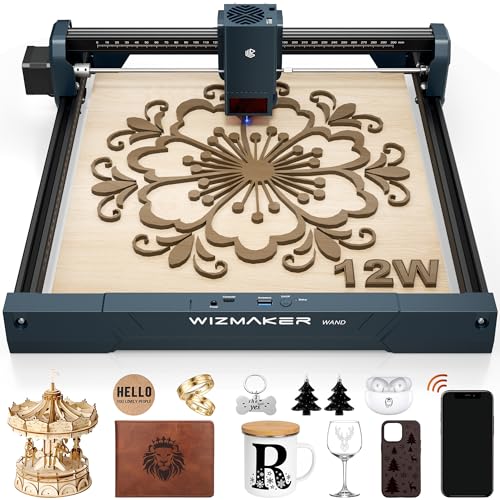
WIZMAKER Wand 12W Diode Laser Engraver
Best for: Speed-focused makers needing large workspace
- Laser Type
- Diode
- Laser Power
- 12W
- Working Area
- 300 x 300 mm
- Engraving Speed
- Up to 10,000 mm/min
- Software Compatibility
- AtomStack, LightBurn, LaserGRBL
- Cutting Capacity
- Wood up to 8mm
View on Amazon: WIZMAKER Wand 12W Diode Laser Engraver Affiliate link
The WIZMAKER Wand 12W offers a 300×300mm work area and 12W diode laser power. It engraves up to 10,000 mm/min with 0.1mm accuracy. The unit supports cutting wood up to 8mm thick. You can connect via Wi-Fi, hotspot, or USB. It works with LightBurn and LaserGRBL software. This machine suits DIY creators and small businesses needing precision.
Pros
- 12W diode laser output for faster cutting
- 300×300mm large working area
- High engraving speed up to 10,000 mm/min
- 0.1mm repeatable positioning accuracy
- Multiple connectivity options including Wi-Fi and USB
Cons
- No dedicated mobile app mentioned in data
- No built-in air assist pump listed
- Requires separate purchase of compatible software licenses
Good fit if
- You need a larger 300x300mm work area
- You want faster engraving speeds for detailed projects
- You prefer wireless connectivity options
Skip if
- You require a dedicated mobile app for control
- You need a built-in air assist system
- You only work with very small items under 100mm
Verdict: WIZMAKER Wand 12W Diode Laser fits makers who prioritize speed and workspace size over integrated app control. It delivers strong cutting performance for wood and leather.

Longer RAY5 10W Laser Engraver with Bed
Best for: DIY users needing large workspace and speed
- Laser Power
- 10W
- Working Area
- 400 x 400mm
- Engraving Speed
- up to 10,000 mm/min
- Cutting Capacity
- 20mm wood, 30mm acrylic
- Compatible Material
- Wood, Metal, Acrylic, Leather, Glass, Paper
- Target Audience
- DIY
View on Amazon: Longer RAY5 10W Laser Engraver with Bed Affiliate link
The Longer RAY5 10W laser engraver uses dual-beam technology to reach speeds of 10,000 mm/min. It offers a 400 x 400mm working area and cuts up to 20mm wood or 30mm acrylic. The unit includes an air pump and a honeycomb worktable for cleaner results. It targets DIY users who need power and space for larger projects.
Pros
- 10W laser output with dual-beam technology
- 400 x 400mm large working area
- Engraving speed up to 10,000 mm/min
- Includes adjustable air pump and honeycomb table
- Built-in thermal and motion safety systems
Cons
- No app control mentioned in specifications
- No remote control listed in features
- No Bluetooth connectivity specified in data
Good fit if
- You need a 400 x 400mm workspace for large projects
- You want fast engraving speeds up to 10,000 mm/min
- You prefer included safety features like thermal detection
Skip if
- You require app-based control for your workflow
- You need to engrave on metal surfaces
- You want a machine with Bluetooth connectivity
Verdict: The Longer RAY5 10W Laser Engraver fits DIY users who need a large 400 x 400mm workspace and fast 10,000 mm/min speeds for cutting thick materials like wood and acrylic.

Woxcker 20W Enclosed Laser Engraver
Best for: Small business batch production
- Laser Power
- 20W (20000mW)
- Working Area
- 300×300mm
- Engraving Speed
- up to 20,000mm/min
- Software Compatibility
- LightBurn, LaserGRBL, CutLabX
- Form Factor
- Class 1, 360° fully enclosed
- Compatible Material
- Wood, Metal, Acrylic, Leather
View on Amazon: Woxcker 20W Enclosed Laser Engraver Affiliate link
The Woxcker L2 MAX is a 20W enclosed laser cutter and engraver with a 300x300mm work area. It reaches speeds up to 20,000mm/min and focuses to 0.01mm. This Class 1 machine includes flame detection and tilt protection. You get flexible control via Wi-Fi, USB, or app. It suits small business owners and DIYers needing power and safety.
Pros
- 20W laser power cuts dense wood like oak
- 300x300mm large work area for batch production
- 0.01mm precision for sharp details on metal
- 360° fully enclosed Class 1 safe design
- Supports LightBurn and LaserGRBL software
Cons
- Heavier build at 16 pounds
- No dedicated display screen listed
- Requires assembly before first use
Good fit if
- You need high power for thick materials
- You want a safe enclosed workspace
- You produce custom small business orders
Skip if
- You prefer a compact desktop size
- You only engrave small items
- You need plug-and-play simplicity
Verdict: Woxcker L2 MAX 20W Enclosed Laser fits makers who need serious cutting power in a safe, enclosed unit. It is ideal for small businesses handling varied materials.
Specifications side by side
| Spec | Carverall 6W Desktop Laser Engraver | ACMER P1 S Pro 6W Laser Engraver | Creality Falcon 10W Laser Engraver | WECREAT Vision 20W Enclosed Laser Engraver | WIZMAKER Wand 12W Diode Laser Engraver | Longer RAY5 10W Laser Engraver with Bed | Woxcker 20W Enclosed Laser Engraver |
|---|---|---|---|---|---|---|---|
| Laser Type | Diode | not stated | not stated | Diode | Diode | not stated | not stated |
| Laser Power | 6W | 6W (6000mW) | 10W | 20W (20,000mW) | 12W | 10W | 20W (20000mW) |
| Working Area | A4 | 380×370mm | 17" x 16" | not stated | 300 x 300 mm | 400 x 400mm | 300×300mm |
| Engraving Speed | 15,000 mm/min | 10,000mm/min | Up to 10000mm/m | 600mm/s | Up to 10,000 mm/min | up to 10,000 mm/min | up to 20,000mm/min |
| Software Compatibility | CutLabX, LightBurn, LaserGRBL | Acmer Studio, LightBurn, LaserGRBL | LightBurn, LaserGRBL | Proprietary software, Lightburn | AtomStack, LightBurn, LaserGRBL | not stated | LightBurn, LaserGRBL, CutLabX |
| Form Factor | Class 1 | not stated | not stated | Fully enclosed (FDA Class 1) | not stated | not stated | Class 1, 360° fully enclosed |
| Cutting Capacity | 8 mm plywood, 5 mm black acrylic | 12mm wood, 8mm acrylic | 5mm basswood, 3mm black acrylic | 10mm wood, 8mm opaque black acrylic | Wood up to 8mm | 20mm wood, 30mm acrylic | not stated |
| Compatible Material | Wood, Metal, Acrylic, Leather, Paper | Wood, Metal, Acrylic, Leather, Glass | Wood, Metal, Acrylic, Leather, Paper | Wood, Metal, Acrylic, Leather | Wood, Acrylic, Leather, Paper | Wood, Metal, Acrylic, Leather, Glass, Paper | Wood, Metal, Acrylic, Leather |
| Features | not stated | not stated | not stated | Camera | not stated | not stated | not stated |
| Target Audience | DIY, Beginners, Small Business | DIY, Small Business | not stated | DIY, Beginners | DIY, Small Business | DIY | DIY, Small Business |
| Size | 6W | P1-6W | Falcon-10W Basic | 20W | WAND12W | 10W | 300mm 20W |
| Dimensions | 1 × 1 × 1 inches | 1 × 1 × 1 inches | 22.4 × 24.9 × 7.79 inches | 24.2 × 21 × 10 inches | 3.94 × 1.97 × 3.94 inches | 29.3 × 5.31 × 22.4 inches | 21.5 × 18.5 × 8.5 inches |
| Weight | not stated | not stated | 7.05 pounds | not stated | 2 pounds | not stated | 16 pounds |
| Color | Gray | Orange,white | Falcon-10W Basic | Basic Pack | Navy Blue | RAY5+17.3"Honeycomb Bed | Black |
| Model | K15 Pro | P1 S PRO 6W | CR-Laser Falcon 10W | LC2321 | WM-LE002 | RAY5 | L2 MAX |
Another guide worth a look: brother laser printer alternatives.
Frequently asked questions
Which alternative offers the best safety for home use?
The WECREAT Vision 20W and Woxcker L2 MAX both feature fully enclosed frames, making them safer for home environments. The WECREAT model includes a built-in camera for precise alignment. These enclosed designs protect you from laser exposure while you work on thicker materials or longer projects.
What is the largest workspace available among these options?
The Longer RAY5 10W provides a spacious 400 x 400mm work area. This large bed allows you to engrave bigger items without resizing your designs. It also moves at 10,000 mm/min, which speeds up production for larger formats compared to the compact A4 bed of the Carverall.
Which machine cuts the thickest materials?
The WECREAT Vision 20W and Woxcker L2 MAX both deliver 20W of laser power. This higher wattage enables them to cut through thicker wood and acrylic more effectively than the 6W or 10W models. They are ideal if you need to process dense materials for small business batches.
Is there a good option for beginners who want ease of use?
The Carverall K15 Pro 6W is designed for beginners who prioritize safety and software ease. Its enclosed design and compact A4 bed make it safe for small, detailed projects. It comes with user-friendly software like CutLabX and LightBurn, reducing the learning curve for new users.
Which engraver is best for DIY users needing speed?
The WIZMAKER Wand 12W Diode Laser is built for speed-focused makers. It offers a large workspace and strong cutting performance for wood and leather. The 12W power level provides a good balance between processing speed and material versatility for DIY enthusiasts who need to move projects quickly.
Can these machines engrave on metal surfaces?
Yes, most listed models support metal engraving. The Carverall 6W, ACMER P1 S Pro, Creality Falcon 10W, and WECREAT Vision 20W all list metal as a compatible material. You can mark metals like stainless steel or aluminum, though deep cutting is generally limited to non-metals like wood and acrylic.
Which alternative is best for small business batch production?
The Woxcker L2 MAX 20W Enclosed Laser is ideal for small business batch production. It combines serious cutting power with a safe, enclosed unit. The 20W diode laser handles varied materials efficiently, allowing you to process larger volumes of wood, acrylic, and leather for commercial orders.